
CI/CD stands for Continuous Integration and Continuous Delivery/Deployment. It helps software teams deliver updates faster and with fewer errors by automating the process of building, testing, and deploying code.
With Continuous Integration (CI), developers regularly merge their code into a shared repository such as GitHub or Bitbucket (Stash). After each merge, automated tools build the project and run tests to catch errors early. This keeps the codebase clean and stable.
Continuous Delivery (CD) goes a step further. Once the code passes all tests, the system prepares it for deployment to environments like testing, staging, or production.
In Continuous Deployment, the process becomes fully automated — every successful code change moves straight to production without manual steps.
Before CI/CD
In the past, software delivery was slow and full of manual work. Developers used to create separate feature branches and worked on them for weeks or even months.
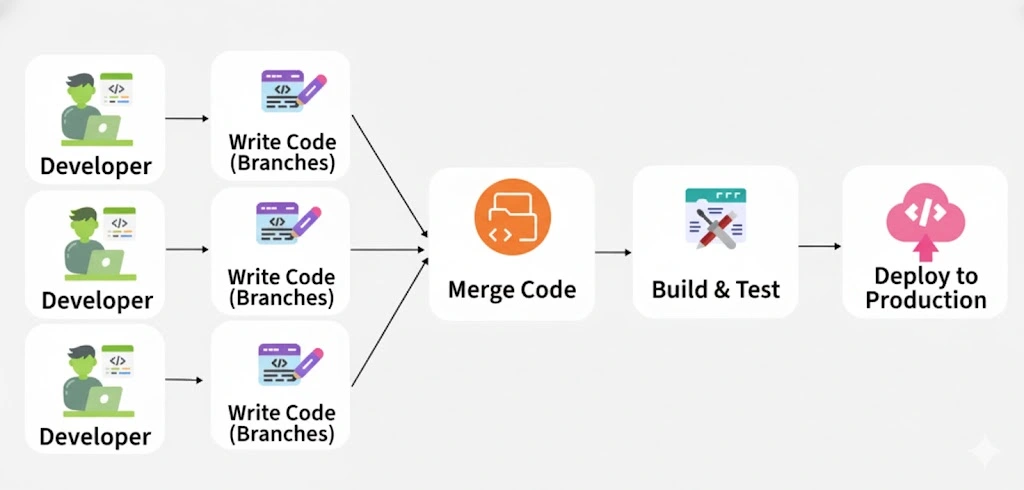
- All these branches were merged at the end, which often caused big conflicts and broken builds. Testing and building the code were also manual, usually done at the final stage, so bugs were discovered very late and were costly to fix.
- Deployment was a long and risky process, taking days or sometimes weeks, because everything was released together in one big update.
- Teams were also divided: developers wrote code, testers tested it, and operations managed servers.
After CI/CD
With CI/CD, the whole process became faster, automated, and more reliable. Developers now commit their code frequently to a shared main branch, which prevents conflicts and ensures smooth integration.
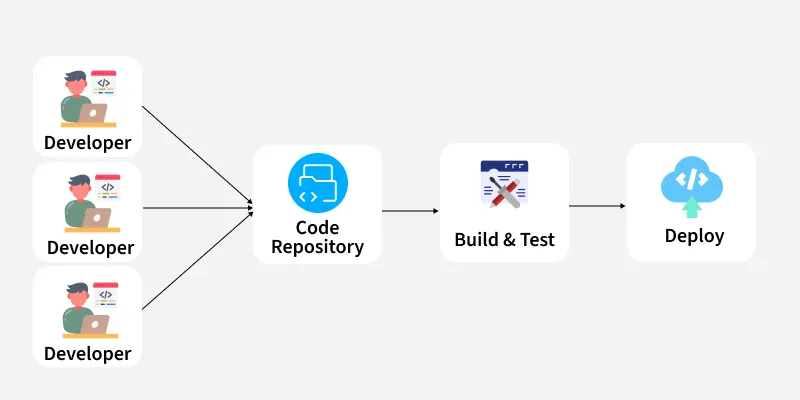
- Automated pipelines run tests, builds, and checks as soon as code is pushed, so errors are caught early. Continuous Delivery makes sure that tested code is automatically packaged and ready for deployment
- While Continuous Deployment takes it a step further by directly releasing to production without manual steps. This means smaller, frequent updates instead of one big risky release.
- Tools like Git, Jenkins, Docker, and Kubernetes automate everything from building to deployment, making the workflow transparent and collaborative. Bugs are fixed quickly, rollbacks are easier, and overall software delivery happens in hours instead of days
Continuous Integration (CI):
Continuous Integration is a development practice where developers frequently integrate (merge) their code changes into a shared repository — often several times a day. Each time new code is added, automated tools build the application and run tests to make sure that everything still works correctly.
This process helps detect errors early, reduces integration issues, and ensures that the codebase is always in a deployable state. Tools like Jenkins, GitLab CI, CircleCI, or GitHub Actions are commonly used to automate these steps.
Continuous Delivery (CD):
Continuous Delivery focuses on automatically preparing and releasing the software to testing or production environments after successful integration. Once the code passes all tests, it is automatically packaged and made ready for deployment.
This means the software can be released at any time with minimal manual effort, ensuring faster delivery of features and fixes. Tools such as Jenkins, Spinnaker, and AWS CodePipeline help achieve continuous delivery.
CI Workflow
Below is a pictorial representation of a CI pipeline– the workflow from developers checking in their code to its automated build, test, and final notification of the build status.
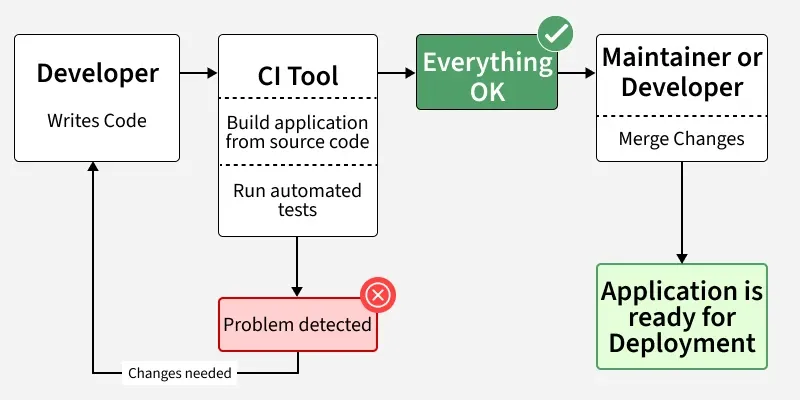
When a developer saves (commits) their code to a version control system like Git, the CI pipeline starts. It takes the new changes, builds the project, and runs tests automatically. After that, the server tells the developer if adding the new code to the existing code worked or failed.
This helps find and fix bugs faster, saves developers from doing the same tasks again and again, and allows the team to release updates to customers more often. Studies show that using CI can save developers about 25–30% of their time.
CI and CD Workflow
The below image describes how Continuous Integration combined with Continuous Delivery helps quicken the software delivery process with lower risks and improved quality.
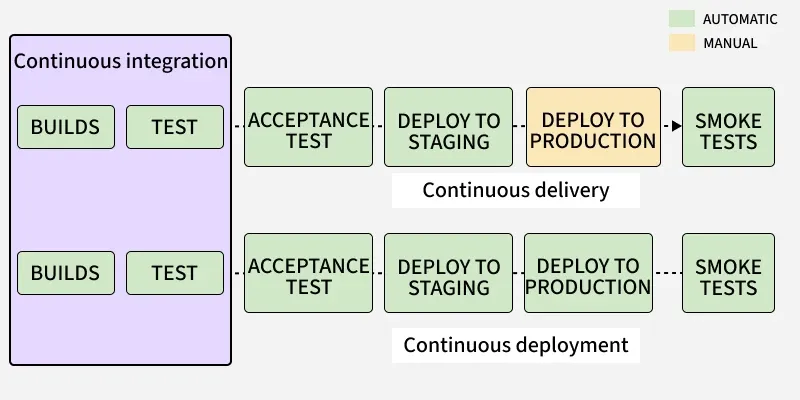
We have seen how Continuous Integration automates the process of building, testing, and packaging the source code as soon as it is committed to the code repository by the developers. After the Continuous Integration (CI) step, the code is deployed to a staging environment.
- In the staging environment, it undergoes further automated testing such as: Acceptance Testing & Regression Testing
- Once tests are successful, the code is deployed to the production environment for the final release.
- If the production deployment is manual, the process is called Continuous Delivery.
- If the production deployment is automated, the process is called Continuous Deployment.
Common CI/CD Tools
CI and CD tools help teams develop, deploy, and test applications efficiently. Some tools focus on integration, while others handle development, testing, and deployment management.
Jenkins is one of the most popular CI/CD tools. It’s open source and allows teams to create a simple CI server that automates the entire delivery pipeline.
Jenkins Workflow in CI/CD
- Developer Commit: The developer pushes code to GitHub, GitLab, or Bitbucket.
- Trigger: Jenkins detects the commit through a webhook or polling.
- Build: Jenkins builds the code using tools such as Maven, Gradle, or Docker.
- Test: It runs automated tests to verify code quality.
- Deploy: Jenkins deploys the code automatically to staging or production.
- Feedback: Developers instantly receive success or failure notifications via email or Slack.
Other Popular CI/CD Tools
- Concourse: An open-source tool that simplifies building CI/CD pipelines.
- GoCD: Helps model and visualize complex workflows.
- Screwdriver: A platform built for continuous delivery automation.
- Spinnaker: A powerful CD platform designed for deploying applications across multiple cloud environments.
What is a CI/CD Pipeline?
Many people think CI/CD and a CI/CD Pipeline are the same, but they are slightly different.
CI/CD (Continuous Integration and Continuous Delivery) is a practice that allows developers to make frequent code changes and deliver updates quickly.
A CI/CD Pipeline defines the step-by-step process that automatically moves code from development to production environment.In simple words, a CI/CD pipeline runs automated steps that let developers build, test, and deploy code safely and quickly.
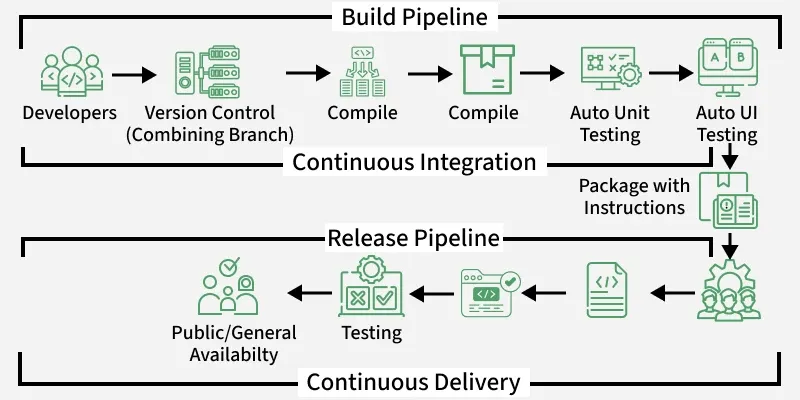
Components of a CI/CD Pipeline
These components create a CI/CD pipeline workflow
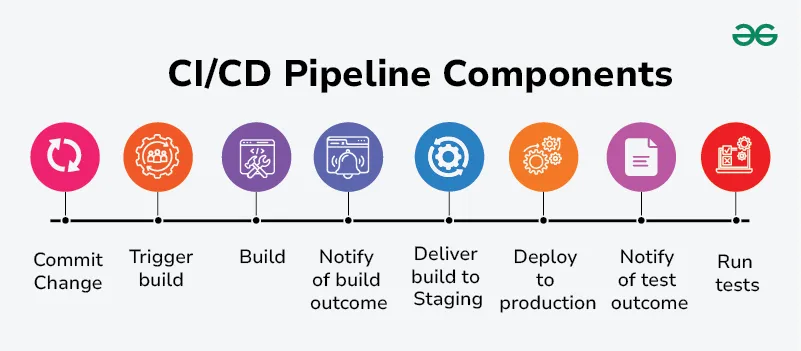
1. Commit Change
Developers make code changes and commit these changes to a version control system (e.g., Git). This step initiates the CI/CD pipeline . Committing code changes ensures that they are tracked and versioned properly.
2. Trigger Build
The version control system detects the new commit and triggers the build process automatically. Automated triggering of the build process ensures that new changes are continuously integrated and tested.
3. Build
The codebase is compiled and built into a deployable artifact, such as a binary executable or a Docker image. Common tools include Maven, Gradle, Ant for Java projects, and Docker for containerized applications. The build step verifies that the code compiles correctly and that all dependencies are resolved.
4. Notify of Build Outcome
The CI/CD system notifies the team of the build results, whether it passed or failed. Immediate feedback on the build status helps developers quickly identify and resolve any build issues. Notification systems can include emails, chat integrations (like Slack or Microsoft Teams), or dashboards in tools like Jenkins or GitLab CI.
5. Run Tests
Automated tests are executed on the build artifact. These can include unit tests, integration tests, end-to-end tests, and more. Testing frameworks like JUnit, Selenium, TestNG, pytest, etc. Running tests ensures that the new code does not introduce any bugs or regressions and that it meets the required quality standards.
6. Notify of Test Outcome
The results of the test suite are reported back to the development team. Quick feedback on test outcomes allows developers to address any failures promptly. Similar to build notifications, results can be sent via email, chat, or dashboards.
7. Deliver Build to Staging
If tests pass, the build artifact is deployed to a staging environment. The staging environment simulates the production environment, allowing for final validation before production deployment. Deployment tools like Ansible, Chef, Puppet, Kubernetes, or cloud-specific services like AWS CodeDeploy.
8. Deploy to Production
After successful validation in staging, the build is automatically or manually promoted to the production environment. This step makes the new features and fixes available to end-users. Deployment strategies might include blue-green deployment, canary releases, or rolling updates to minimize downtime and risk.
CI/CD Security
CI/CD security is all about protecting software development pipelines from hackers, data leaks, and security flaws. By adding security checks at every stage of development, teams can catch problems early and prevent attacks.
Common Security Risks:
- Code & Dependencies: Using outdated or unsafe libraries can introduce vulnerabilities.
- Pipeline Access: Weak passwords or excessive access can let attackers in.
- Container & Artifact Security: Running unverified images may lead to security breaches.
- Infrastructure Security: Poorly configured cloud settings can expose data or allow unauthorized access.
CI/CD (Continuous Integration and Continuous Delivery) is a set of practices that aim to streamline and automate the software development process. CI focuses on integrating code changes frequently and automatically running tests to ensure code quality.
Conclusion
CI/CD has completely transformed the way software is built, tested, and deployed. By automating repetitive tasks and integrating code changes continuously, teams can deliver updates faster, with fewer bugs, and more confidence. Continuous Integration ensures code stability through frequent testing, while Continuous Delivery and Continuous Deployment automate the release process, minimizing manual intervention. With tools like Jenkins, GitLab CI, Docker, and Kubernetes, organizations achieve faster releases, higher quality, and improved collaboration between development and operations teams. In short, CI/CD makes modern software delivery efficient, reliable, and scalable — a key pillar of DevOps success.
