
Deployments often cause downtime when the old version of an application is stopped before the new version is ready.
Even a short outage can break user trust.
In this blog, I explain how I implemented a true zero-downtime Blue-Green deployment using Docker, Docker Compose, and Nginx, all on a single EC2 instance, without using any cloud load balancer.
The key idea is simple:
Failover is handled by Nginx at request level, not by scripts
Objective of This Project
The goal of this setup is to:
- Run two versions of the application at the same time (Blue & Green)
- Route traffic through Nginx reverse proxy
- Automatically fall back to the older version on failure
- Ensure users never see 5xx errors or downtime
- Allow safe redeployment after fixing the issue
This entire system runs on one EC2 Free Tier instance
What Is Blue-Green Deployment?
Blue-Green Deployment means maintaining two environments:
- Blue → Stable, previous version
- Green → New version
Only one version actively serves traffic, while the other stays ready as a fallback.
In this project:
- Green is the primary
- Blue is the backup
Both are always running.
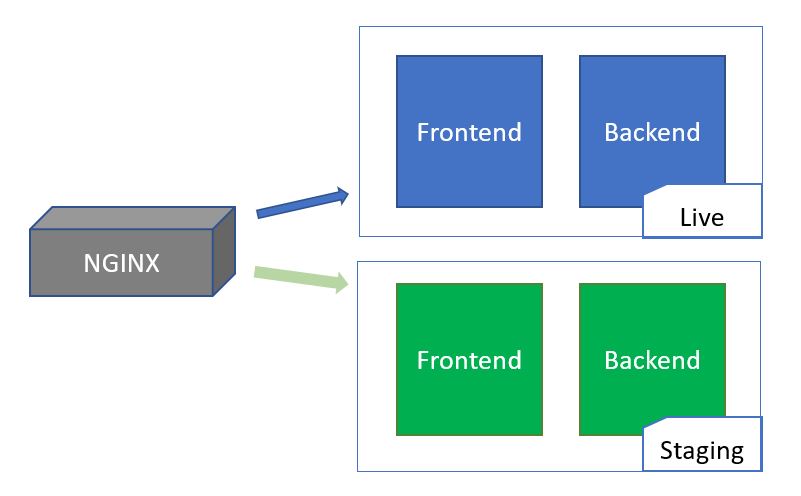
High-Level Architecture

Flow:
User → Nginx → Green (primary)
If Green fails → Nginx → Blue (backup)
All containers communicate using a Docker user-defined bridge network.
Why Traditional Approaches Fail
Many setups rely on scripts or health-check loops.
Problems with that approach:
- Failure is detected after users are affected
- Rollback always has a delay window
- Scripts add complexity and risk
This project avoids all of that by letting Nginx handle failover per request
Why This Approach Works
Nginx retries failed requests internally.
That means:
- The user request does not fail
- The retry happens before the response is sent
- The user never sees an error
This guarantees true zero downtime.
Project Structure
blue-green-deployment/
├── app_blue/
│   ├── index.html
│   └── Dockerfile
├── app_green/
│   ├── index.html
│   └── Dockerfile
├── nginx/
│   └── nginx.conf
├── docker-compose.yml
└── README.md
Both applications are identical except for a visible version label.
Application Setup (Blue & Green)
Application Setup (Blue & Green)
Each application version—Blue and Green—is deployed as a static website using a lightweight Nginx container. Nginx efficiently serves the static content while keeping resource usage minimal. Running both versions in separate containers allows traffic to be switched smoothly during deployments, supporting a reliable and zero-downtime release process.
Blue Application
Dockerfile (app_blue/Dockerfile)
FROM nginx:alpine
COPY . /usr/share/nginx/html/
Green Application
Dockerfile (app_green/Dockerfile)
FROM nginx:alpine
COPY . /usr/share/nginx/html/
Only the UI text differs so the active version is clearly visible.
Docker Compose Configuration
Docker Compose is used to:
- Start Blue and Green together
- Attach all services to the same network
- Run a single Nginx reverse proxy on port 80
Both application containers are always running
docker compose up -d --buildCore Logic: Nginx Configuration
This is the heart of the project.
Final nginx.conf
events {}

http {
    upstream app_backend {
        server green:80 max_fails=1 fail_timeout=0;
        server blue:80 backup;
    }

    server {
        listen 80;

        location / {
            proxy_pass http://app_backend;
            proxy_http_version 1.1;
            proxy_set_header Connection "";

            proxy_connect_timeout 1s;
            proxy_send_timeout 1s;
            proxy_read_timeout 1s;

            proxy_next_upstream error timeout http_500 http_502 http_503 http_504;
            proxy_next_upstream_tries 2;
            proxy_next_upstream_timeout 0;
        }
    }
}
How Automatic Failover Works
Normal State
- Green serves all traffic
- Blue stays idle as backup
Failure Scenario
- Green crashes or times out
- Nginx detects failure on the request
- The same request is retried on Blue
- User receives a successful response
- Nginx avoids Green until redeploy
The user never sees a 5xx error
Recovery Process
After fixing Green:
docker start green
docker exec nginx_proxy nginx -s reload
Green becomes the primary again.
Testing Zero Downtime
Failover was tested by stopping Green while refreshing the website continuously.
docker stop greenResult:
- No 502 or 504 errors
- No visible downtime
- Immediate fallback to Blue
This confirms absolute zero downtime from the user’s perspective
Commands Used
Docker & Compose
docker compose up -d --build
docker compose down
docker ps
Nginx Reload
docker exec nginx_proxy nginx -s reloadDebugging Network
docker exec -it nginx_proxy sh
ping green
ping blue
Why This Is Production-Grade
This design mirrors how real systems like ALB, HAProxy, and Envoy work:
- Proxy-level failover
- Request-level retries
- No user-visible errors
- Predictable rollbacks
All achieved using only open-source tools.
Conclusion
This project demonstrates a true zero-downtime Blue-Green deployment using:
- Docker
- Docker Compose
- Open-source Nginx
By shifting rollback logic from scripts to the proxy layer, the system achieves:
- Instant failover
- No downtime
- Safe deployments
This is a strong real-world DevOps project and an excellent learning example.

