
Introduction
In modern DevOps teams, engineers usually manage many applications at the same time. However, when each application has its own Jenkins pipeline written from scratch, problems quickly appear. Pipelines become repetitive, maintenance becomes harder, and CI/CD practices start to differ between projects.
Because of this, teams need a better approach. In this blog, we explain how Jenkins Shared Libraries help solve these issues by allowing teams to reuse pipeline logic. As a result, CI/CD becomes cleaner, more scalable, and easier to manage.
Problem Statement
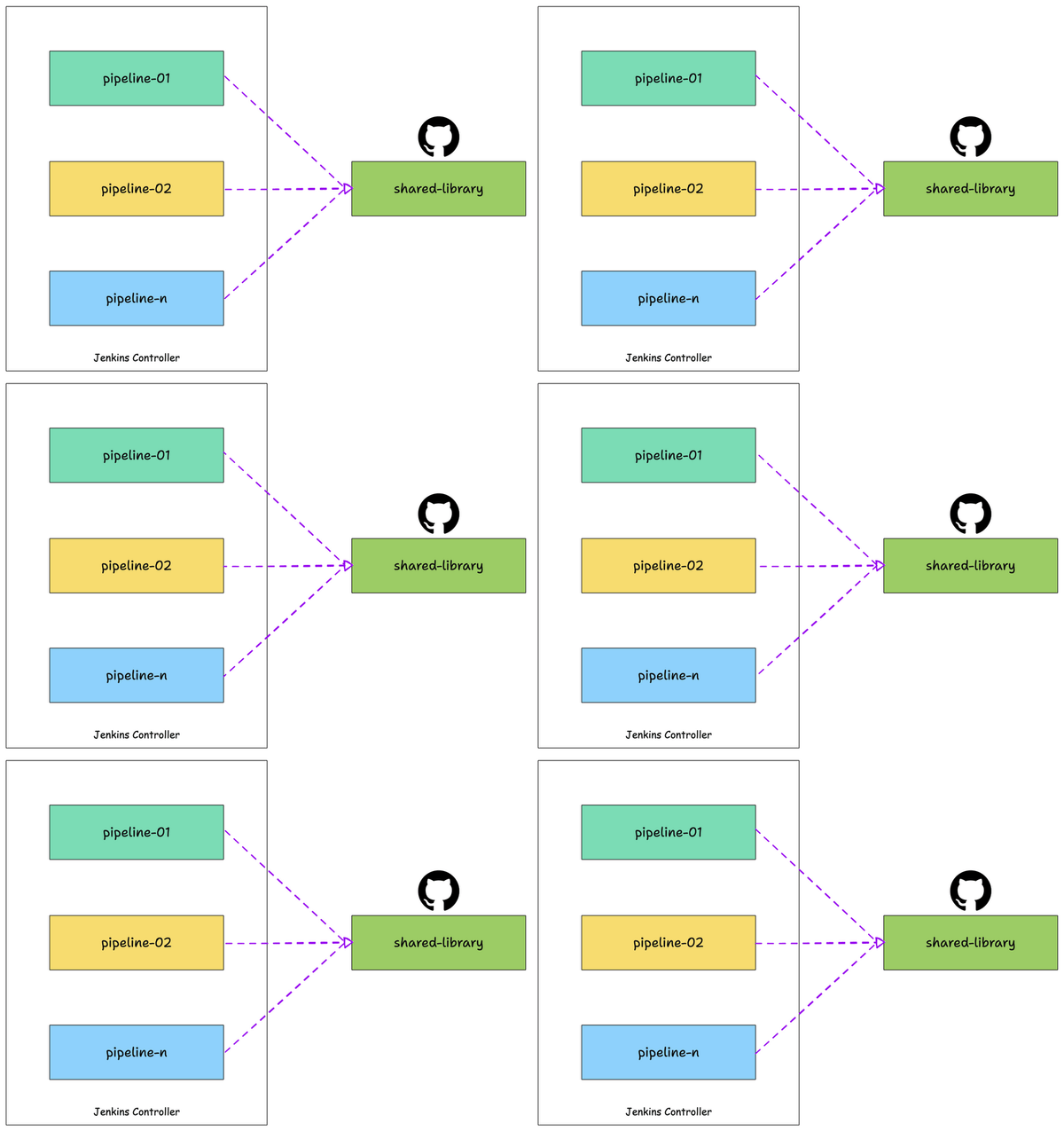
When every application repository contains a full Jenkinsfile, the same steps appear again and again. For example, pipelines often repeat tasks like cloning repositories, building Docker images, and pushing images to Docker Hub. Over time, this repetition increases complexity and makes pipelines difficult to maintain.
Moreover, when teams need to change the pipeline logic, they must update every repository manually. As a result, this approach does not scale and increases the risk of mistakes as the number of applications grows.
Objective of This Project
The main goal of this project is to build a centralized CI/CD solution using Jenkins Shared Libraries. Instead of placing pipeline logic inside each application repository, we move all reusable logic into a shared location.
By doing this, teams standardize Docker-based pipelines and reduce duplicated Jenkinsfile code. In addition, this design improves long-term maintainability and makes future changes easier. The pipeline automatically clones the repository, builds Docker images, and pushes them to Docker Hub.
Tools and Technologies Used
This project uses Jenkins running on an AWS EC2 instance with Ubuntu. In addition, Jenkins Shared Libraries handle reusable CI/CD logic, while Git and GitHub manage source code. Docker builds container images, and Docker Hub stores them. Finally, AWS EC2 provides the infrastructure to run Jenkins and Docker reliably.
Project Architecture Overview
The solution uses two separate GitHub repositories, each with a clear role. Because of this separation, application code stays independent from CI/CD logic. As a result, teams can reuse the same pipeline across multiple projects without changes.
1. Jenkins Shared Library Repository
The Jenkins Shared Library repository stores all reusable CI/CD logic. It defines how Docker images are built and pushed, and multiple application repositories can use it without modification.
Inside the repository, the pipeline logic lives in the vars directory. This simple structure makes it easy for Jenkins to load and execute the shared pipeline whenever needed.
Repository name:
jenkins-shared-libraryStructure:
jenkins-shared-library/
├── vars/
│   └── dockerPipeline.groovy
└── README.md
The dockerPipeline.groovy file defines how Docker images are built and pushed. This logic can now be reused by multiple application repositories
2. Application Repository
The application repository contains only application-related files. For example, it includes the Dockerfile, which defines how the application runs inside a container, and a minimal Jenkinsfile.
Instead of containing pipeline logic, this Jenkinsfile simply calls the shared library and passes configuration values. Therefore, the repository remains clean, readable, and easy to manage.
Repository name:
demo-docker-appStructure:
demo-docker-app/
├── Dockerfile
└── Jenkinsfile
The application repository does not contain CI/CD logic. Instead, it simply calls the shared library and passes configuration values
CI/CD Pipeline Flow
When a Jenkins job starts, Jenkins first loads the shared library. Next, it clones the application repository. After that, it builds the Docker image using the Dockerfile. Finally, it pushes the image to Docker Hub.
Because every application uses the same flow, pipelines behave consistently across projects. As a result, teams spend less time debugging CI/CD issues.
Shared Library Pipeline Logic
The shared library exposes a reusable pipeline function named dockerPipeline. This function accepts configuration values such as the Git repository URL, Docker image name, image tag, and Docker Hub credentials.
Because the function uses configuration instead of hardcoded values, teams can reuse the same logic for many applications. Therefore, any pipeline improvement needs to be made only once.
dockerPipeline(Map config)Parameters Used
gitUrl– URL of the application repositoryimageName– Docker image nametag– Docker image tagcredentialsId– Docker Hub credentials stored in Jenkins
This makes the pipeline flexible while keeping the logic centralized
Jenkinsfile (Application Repository)
The Jenkinsfile inside the application repository is intentionally kept very small and clea
@Library('docker-lib') _
dockerPipeline(
    gitUrl: 'https://github.com/USERNAME/demo-docker-app.git',
    imageName: 'DOCKERHUB_USERNAME/demo-docker-app',
    tag: 'latest',
    credentialsId: 'dockerhub-creds'
)
This file:
- Imports the shared library
- Passes only configuration values
- Contains no CI/CD logic
As a result, application repositories remain lightweight and easy to manage.
Dockerfile (Application Repository)
The Dockerfile stays inside the application repository, where it belongs. It defines how the application is built and served inside a container. The CI/CD pipeline does not need to know application-specific details and only focuses on automation.
FROM nginx:alpine
COPY . /usr/share/nginx/html
EXPOSE 80
This defines how the application is containerized, while the pipeline only handles automation.
Jenkins Configuration Requirements
To make this setup work, Jenkins must be configured correctly. Docker Hub credentials are stored securely in the Jenkins Credentials Manager, and the Jenkins agent must have access to Docker. The shared library is configured under Global Pipeline Libraries, and the correct default branch is set to avoid pipeline failures.
Results
After implementing this solution, Docker images were built and pushed successfully. Jenkins pipelines ran without errors, and the same CI/CD logic was reused across multiple projects. This confirms that the shared library approach works as expected and simplifies pipeline management.
Key Learnings
This project clearly shows the value of Jenkins Shared Libraries in real-world CI/CD systems. Centralizing pipeline logic reduces duplication, keeps application repositories lightweight, and makes pipelines easier to scale and maintain. Separating application code from CI/CD logic also improves clarity and long-term stability.
Conclusion
This implementation demonstrates a real-world CI/CD pattern commonly used in production environments. By using Jenkins Shared Libraries, we achieved reusability, scalability, and maintainability while keeping application repositories simple and focused. This approach not only reduces duplication but also makes CI/CD pipelines easier to manage as teams and applications grow
