
A Conditional GitLab CI/CD Pipeline allows teams to control how jobs execute based on branches and events. Instead of running the same jobs for every commit, this approach ensures that development, production, and merge request workflows are clearly separated.
In this guide, we implement a Conditional GitLab CI/CD Pipeline that triggers automatically and executes different jobs depending on whether code is pushed to dev, pushed to main, or submitted through a merge request.
This structured approach reflects real-world DevOps practices and prevents unnecessary or risky deployments.
Understanding the Objective
The goal of this pipeline is simple in theory but critical in practice:
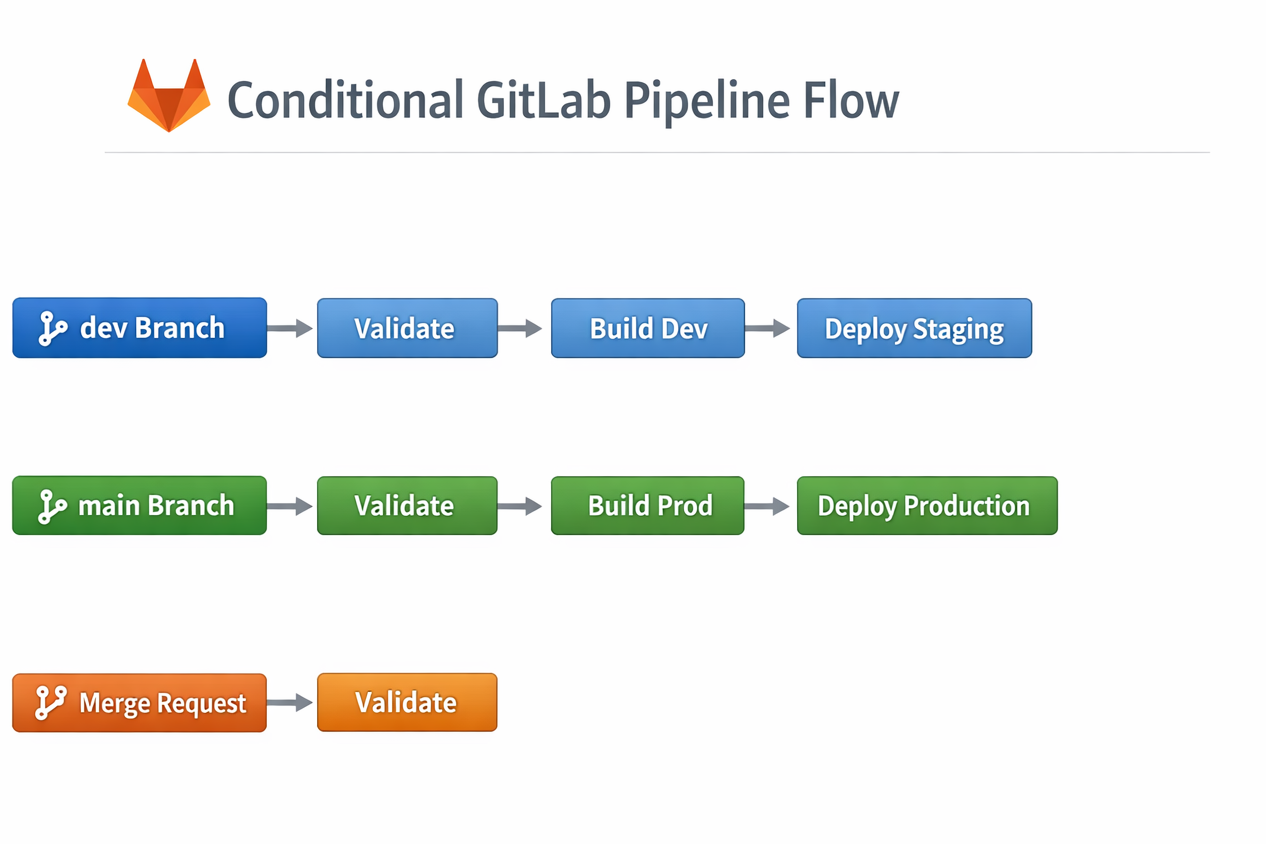
- When code is pushed to the dev branch, only development or staging jobs should run.
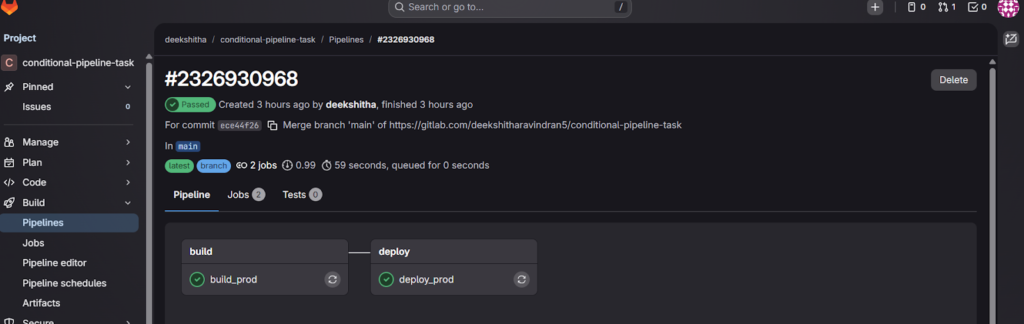
- When code is pushed to the main branch, only production-related jobs should execute.
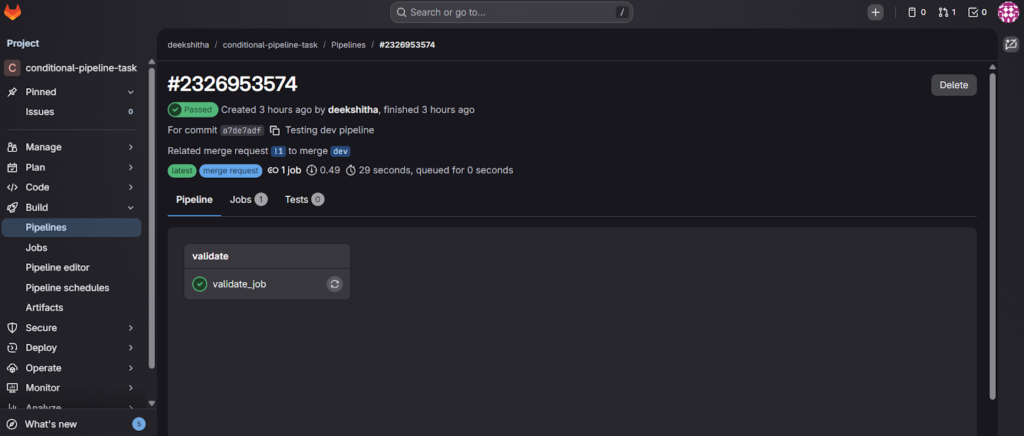
- When a merge request is created or updated, only validation and testing jobs must run.
- Deployment jobs must never run during merge requests.
- The pipeline should trigger automatically without manual intervention.
This ensures efficiency, prevents accidental production deployments, and maintains a clean DevOps workflow.
Why Use a Conditional GitLab CI/CD Pipeline?
A Conditional GitLab CI/CD Pipeline ensures that:
- Development branches trigger only staging-related tasks
- Production branches trigger only production jobs
- Merge requests run validation checks without deploying
Without conditional logic, pipelines waste resources and increase the risk of accidental production releases. Branch-based rules solve this problem by using GitLab’s built-in CI variables.
Designing the Pipeline Structure
A well-structured pipeline must include clearly defined stages. For this task, we define:
- validate
- build
- deploy
Each stage represents a logical phase in the software lifecycle.
Writing the .gitlab-ci.yml Configuration
Below is the working configuration that satisfies all acceptance criteria.
stages:
  - validate
  - build
  - deploy

# Validation job (Runs for all branches and merge requests)
validate_job:
  stage: validate
  script:
    - echo "Running validation checks..."
  rules:
    - if: '$CI_PIPELINE_SOURCE == "merge_request_event"'
    - if: '$CI_COMMIT_BRANCH == "dev"'
    - if: '$CI_COMMIT_BRANCH == "main"'

# Development build (Only for dev branch)
build_dev:
  stage: build
  script:
    - echo "Building application for development..."
  rules:
    - if: '$CI_COMMIT_BRANCH == "dev"'

# Production build (Only for main branch)
build_prod:
  stage: build
  script:
    - echo "Building application for production..."
  rules:
    - if: '$CI_COMMIT_BRANCH == "main"'

# Staging deployment (Only for dev branch)
deploy_staging:
  stage: deploy
  script:
    - echo "Deploying to staging environment..."
  rules:
    - if: '$CI_COMMIT_BRANCH == "dev"'

# Production deployment (Only for main branch)
deploy_production:
  stage: deploy
  script:
    - echo "Deploying to production environment..."
  rules:
    - if: '$CI_COMMIT_BRANCH == "main"'
This configuration ensures that jobs execute only when their branch conditions are satisfied.
How the Conditional Logic Works
GitLab evaluates the rules section inside each job. If the condition evaluates to true, the job runs. Otherwise, it is skipped.
For example:
- When pushing to
dev, onlybuild_devanddeploy_stagingexecute. - When pushing to
main, only production jobs run. - During merge requests, only the validation job runs.
This prevents accidental production deployments and avoids unnecessary job execution.
Step-by-Step Implementation in GitLab
Step 1: Create or Open Your GitLab Project
Navigate to your repository in GitLab.

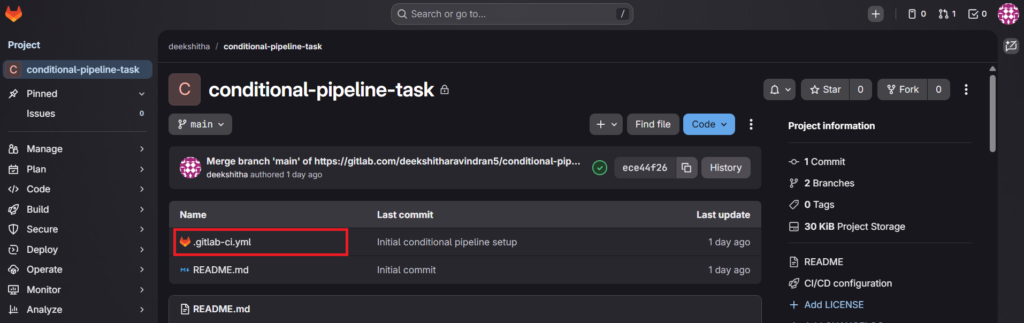
Step 2: Create the .gitlab-ci.yml File
Go to:
Repository → Files → Create New File
Name it:
.gitlab-ci.yml
Paste the configuration shown above and commit the changes.
Cloning the Repository for Testing
To properly test branch-based execution, clone your repository locally.
Go to:
Project → Code → Clone → HTTPS
Then run the following commands in your terminal:
git clone https://gitlab.com/your-username/your-project-name.git
cd your-project-name
Step 3: Verify Automatic Pipeline Trigger
After committing, navigate to:
CI/CD → Pipelines
You should see a pipeline automatically triggered.
Testing All Required Scenarios
To pass the task validation, you must test all three scenarios.
Scenario 1: Push to Dev Branch
Switch to or create the dev branch:
git checkout -b dev
If it already exists:
git checkout dev
Make a small change in your project (for example, modify README.md), then execute:
git add .
git commit -m "Testing dev branch pipeline"
git push origin dev
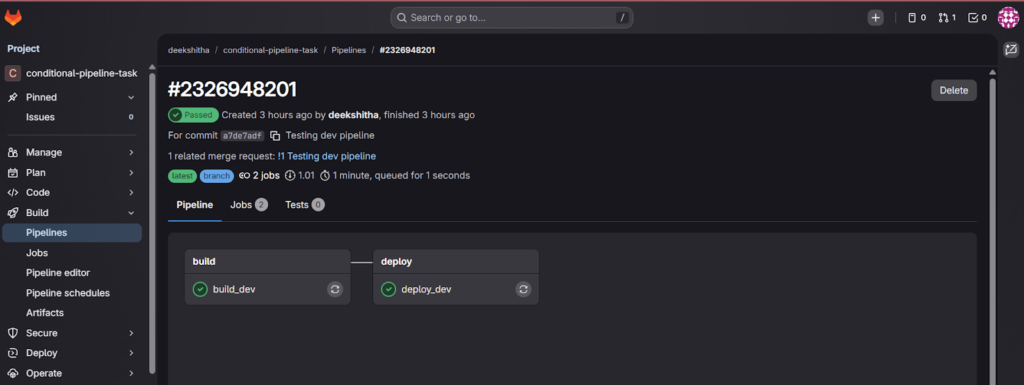
After pushing, GitLab automatically triggers the pipeline.
Scenario 2: Push to Main Branch
Switch to main:
git checkout main
Pull latest changes:
git pull origin main
Make a small change and run:
git add .
git commit -m "Testing production pipeline"
git push origin main
The production pipeline should now execute.
Scenario 3: Create a Merge Request
Push changes to dev first, then create a merge request:
- Navigate to GitLab → Merge Requests
- Click “New Merge Request”
- Source branch: dev
- Target branch: main
- Create the merge request
GitLab automatically triggers a pipeline for the merge request.
How Reviewers Validate This Task
A reviewer should be able to:
- Push to dev and see only development jobs.
- Push to main and see only production jobs.
- Create a merge request and see only validation jobs.
If all three conditions behave correctly, the task is successfully completed.
Common Failure Scenarios to Avoid
Several mistakes can cause rejection:
- Running identical jobs for all branches.
- Allowing production deployment from
dev. - Triggering deployments during merge requests.
- Using
onlyinstead ofrulesincorrectly. - Failing to trigger pipelines automatically.
Always test thoroughly before submission.
Best Practices for Branch-Based Pipelines
When building real-world CI/CD systems:
- Separate environments strictly.
- Never allow production deployment from development branches.
- Keep validation jobs lightweight.
- Use clear stage naming.
- Monitor logs under CI/CD → Jobs for transparency.
GitLab logs provide full visibility into execution, which helps debugging and auditing.
Conclusion
Implementing a conditional GitLab pipeline is not just an academic task; it reflects real DevOps maturity. By structuring the pipeline into stages and using rule-based execution, we ensure safe deployments, optimized resource usage, and environment isolation.
This approach prevents accidental production releases, improves development workflow, and satisfies strict review requirements.
A properly designed conditional pipeline demonstrates clear understanding of CI/CD architecture and practical DevOps implementation.
