
Introduction
Terraform has become the backbone of modern Infrastructure as Code (IaC). From startups to enterprise-scale cloud environments, teams rely on it to provision, manage, and scale infrastructure safely and efficiently. This guide explains industry-level Terraform best practices, essential commands, and infrastructure patterns for an ideal setup. The content is structured to be Yoast SEO friendly, highly readable, and written in active voice.
Why Terraform Best Practices Matter
Teams that skip best practices often struggle with state conflicts, broken deployments, and security risks. Production-grade environments demand structure, version control, automation, and clear separation of responsibilities. A disciplined Terraform setup improves collaboration, reduces downtime, and ensures predictable deployments.
Organizations running workloads on AWS, Azure, or GCP treat Terraform as a core DevOps component, not just a provisioning tool.
1. Follow a Clean Terraform Project Structure
A structured repository prevents chaos as infrastructure grows. Separate environments and reusable modules clearly.

A typical industry-level structure looks like this:
terraform/
│
├── modules/
│   ├── vpc/
│   ├── ec2/
│   └── rds/
│
├── environments/
│   ├── dev/
│   ├── staging/
│   └── prod/
│
└── backend.tf
Reusable modules live inside the modules/ directory. Environment-specific configurations stay isolated inside dev, staging, and prod folders. This structure prevents accidental changes in production and supports controlled deployments.
2. Always Use Remote Backend with State Locking
Terraform state files are critical. Losing or corrupting state can destroy infrastructure consistency.
Production environments use:
- Remote state storage (Amazon S3, Azure Storage, GCS)
- State locking (DynamoDB for AWS)
- Encrypted storage
Example AWS backend configuration:
terraform {
  backend "s3" {
    bucket         = "my-terraform-state"
    key            = "prod/terraform.tfstate"
    region         = "ap-south-1"
    dynamodb_table = "terraform-lock"
    encrypt        = true
  }
}
Remote state enables team collaboration and prevents concurrent modifications.
3. Use Terraform Modules for Reusability
Modules reduce duplication and enforce standards across teams. Instead of rewriting VPC or EC2 configurations, define them once and reuse everywhere.
Benefits include:
- Standardized infrastructure patterns
- Faster deployments
- Easier maintenance
- Improved scalability
Teams often maintain a private module registry to enforce security policies and tagging standards.
4. Maintain Separate Environments Properly
Never mix development and production configurations. Each environment must have:
- Separate state files
- Separate variable files
- Different backend keys
Use .tfvars files for environment customization:
terraform apply -var-file="prod.tfvars"
This approach prevents configuration drift and accidental production impact.
5. Essential Terraform Commands
Understanding commands deeply is critical for production readiness.
Initialization
terraform init
Initializes backend, downloads providers, and prepares the working directory.
Validation
terraform validate
Checks syntax correctness before deployment.
Formatting
terraform fmt
Enforces clean, consistent code formatting.
Planning
terraform plan
Shows execution plan before making changes.
Apply
terraform apply
Creates or updates infrastructure.
Destroy
terraform destroy
Removes managed infrastructure safely.
6. Integrate Terraform with CI/CD Pipelines
Manual deployments increase risk. Production systems integrate Terraform with CI/CD tools like:
- GitHub Actions
- GitLab CI
- Jenkins
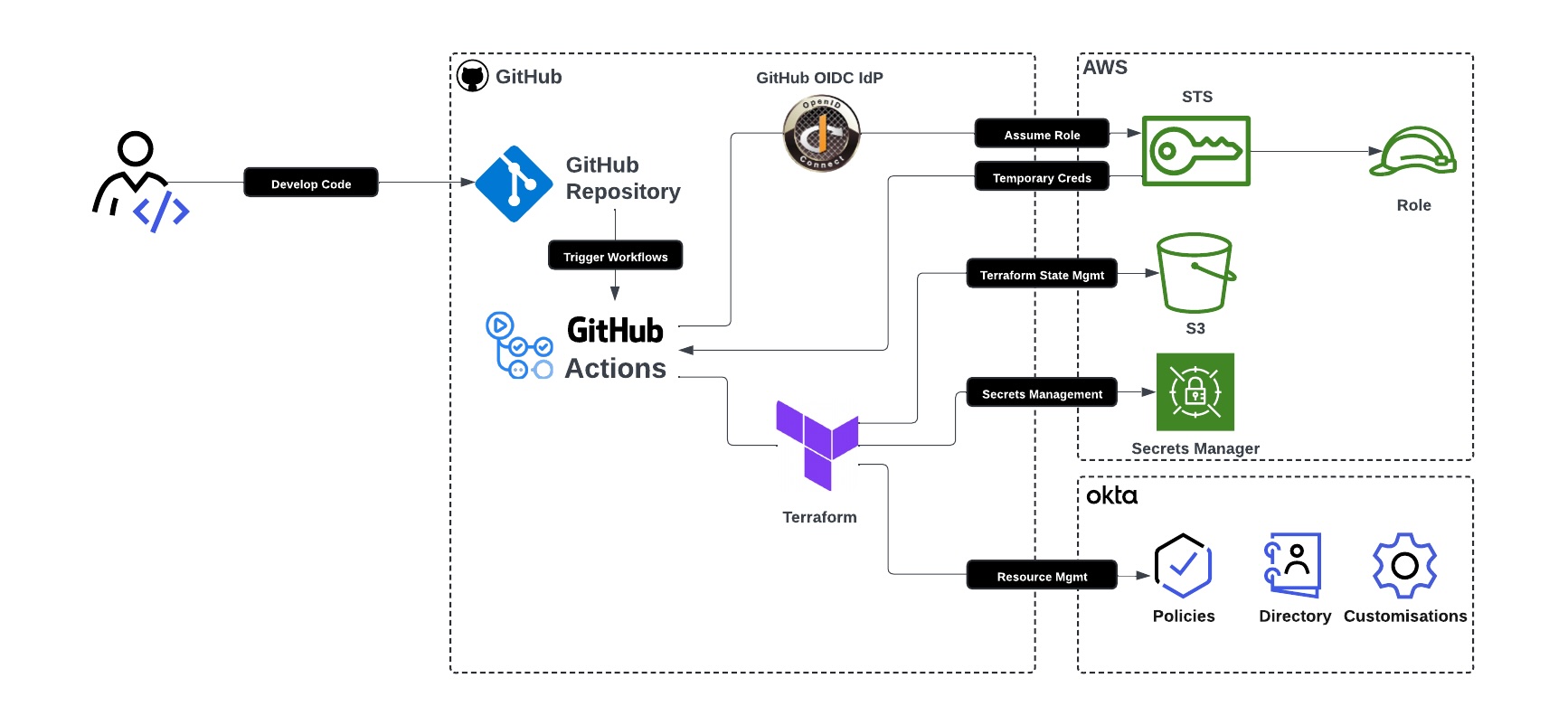
A standard pipeline includes:
- Code push
- Terraform fmt check
- Terraform validate
- Terraform plan
- Manual approval (for prod)
- Terraform apply
Automation reduces human error and enforces review processes.
7. Enforce Code Quality with Pre-Commit Hooks
Professional teams use:
tflintfor lintingcheckovfor security scanningterraform fmtchecks
These tools prevent insecure configurations from reaching production.
8. Implement Proper Variable and Secret Management
Hardcoding credentials is dangerous. Instead:
- Use environment variables
- Integrate AWS Secrets Manager or Azure Key Vault
- Store sensitive variables as
sensitive = true
Example:
variable "db_password" {
  type      = string
  sensitive = true
}
This practice protects credentials and reduces exposure risk.
9. Apply Proper Resource Tagging Standards
Tagging improves cost management and governance.
Standard tags often include:
- Environment
- Project
- Owner
- CostCenter
Consistent tagging enables monitoring, auditing, and cost tracking.
10. Use Version Constraints for Stability
Specify provider versions to avoid unexpected changes.
terraform {
  required_providers {
    aws = {
      source  = "hashicorp/aws"
      version = "~> 5.0"
    }
  }
}
Version pinning prevents sudden provider updates from breaking infrastructure.
11. Use depends_on Carefully
Terraform automatically detects dependencies. Use depends_on only when implicit dependencies fail. Overusing it reduces flexibility and increases complexity.
12. Implement Infrastructure Drift Detection
Run terraform plan regularly in CI pipelines to detect manual infrastructure changes. This ensures infrastructure consistency and compliance.
13. Follow Security-First Infrastructure Practices
Secure Terraform setups include:
- IAM least privilege access
- Encrypted state files
- Secure backend configuration
- Audit logging enabled
- Multi-factor authentication for cloud access
Security must remain integrated from the beginning.
14. Document Everything Clearly
Maintain a README file explaining:
- Environment setup
- Backend configuration
- Module usage
- Deployment steps
Clear documentation reduces onboarding friction and operational mistakes.
Ideal Terraform Infrastructure Setup (Industry Model)
A production-ready Terraform setup includes:
- Remote state backend
- Modular architecture
- Separate environments
- CI/CD integration
- Code linting and validation
- Version pinning
- Secret management
- Access control policies
Organizations that follow these standards achieve scalable, secure, and maintainable cloud infrastructure.
Final Thoughts
Terraform best practices transform simple scripts into production-grade infrastructure automation systems. Teams that structure projects properly, secure state files, enforce automation, and follow DevOps principles avoid costly mistakes. Infrastructure as Code becomes powerful only when implemented with discipline.
If you are preparing for DevOps interviews or building real-world cloud projects, mastering these Terraform industry best practices will set you apart.
Conclusion
Terraform delivers real power when teams treat it as a structured engineering discipline rather than a simple provisioning tool. A well-designed project layout, remote state management with locking, modular architecture, environment separation, CI/CD automation, version pinning, and security-first practices create a stable and scalable infrastructure foundation. These best practices reduce deployment risks, prevent configuration drift, and improve collaboration across DevOps teams.
Industry-grade Terraform setups focus on predictability and control. Clear documentation, proper tagging standards, secret management, and automated validation ensure that infrastructure remains consistent as systems grow. Organizations that implement these standards build resilient cloud environments that support rapid innovation without sacrificing security or stability.
Mastering these Terraform best practices prepares you for real-world DevOps roles and production cloud projects. Strong Infrastructure as Code discipline not only strengthens technical execution but also builds trust in automated systems. Consistent implementation turns Terraform from a tool into a long-term infrastructure strategy.
