
Introduction
Infrastructure as Code has transformed how engineers deploy and manage cloud resources. Instead of manually creating infrastructure through cloud consoles, developers can now define infrastructure in code and reproduce environments consistently. Terraform plays a major role in this shift because it allows teams to automate infrastructure provisioning using a declarative configuration language.
As infrastructure grows, Terraform configurations can quickly become large and difficult to manage. At this point, Terraform modules become extremely useful. Modules allow developers to break infrastructure into reusable components, which improves maintainability, scalability, and collaboration across teams.
This article demonstrates how to build AWS infrastructure using Terraform modules while following industry best practices. The configuration creates a VPC, subnet, security group, and EC2 instance, while also enabling SSH access through a key pair. Furthermore, the infrastructure remains modular so that individual components can be reused in future projects.
Why Terraform Modules Matter
Terraform modules help organize infrastructure code into reusable units. Instead of writing large configuration files, developers can separate infrastructure into logical components such as networking, compute resources, and security configurations.
A modular approach improves readability and encourages consistent infrastructure design. Additionally, modules simplify collaboration because teams can reuse standardized modules across multiple environments.
For example, a networking team can maintain a VPC module, while application teams reuse that module when deploying compute resources. Consequently, this separation reduces duplication and improves infrastructure reliability.
Project Structure
A well-structured Terraform project separates the root configuration from reusable modules. The root configuration orchestrates the infrastructure while modules define individual components.
The following structure demonstrates a clean Terraform project layout.
terraform-modules-infra/
│
├── main.tf
├── outputs.tf
├── variables.tf
│
├── modules/
│   ├── vpc/
│   │   ├── main.tf
│   │   ├── variables.tf
│   │   └── outputs.tf
│   │
│   └── ec2/
│       ├── main.tf
│       ├── variables.tf
│       └── outputs.tf
This structure keeps the root configuration simple while allowing modules to handle the complexity of resource creation.
Creating the VPC Module
The VPC module provisions the networking layer required for the EC2 instance. It creates a Virtual Private Cloud, a public subnet, an internet gateway, and a route table to enable internet connectivity.
First, define the variables used by the module.
variable "vpc_cidr" {
  type = string
}

variable "subnet_cidr" {
  type = string
}

variable "availability_zone" {
  type = string
}
Next, define the networking resources in the module configuration.
resource "aws_vpc" "main_vpc" {
  cidr_block = var.vpc_cidr

  tags = {
    Name = "terraform-module-vpc"
  }
}

resource "aws_subnet" "public_subnet" {
  vpc_id                  = aws_vpc.main_vpc.id
  cidr_block              = var.subnet_cidr
  availability_zone       = var.availability_zone
  map_public_ip_on_launch = true

  tags = {
    Name = "terraform-module-subnet"
  }
}
Internet access is required for SSH connectivity, so the module also creates an internet gateway and route table.
resource "aws_internet_gateway" "igw" {
  vpc_id = aws_vpc.main_vpc.id
}

resource "aws_route_table" "public_rt" {
  vpc_id = aws_vpc.main_vpc.id

  route {
    cidr_block = "0.0.0.0/0"
    gateway_id = aws_internet_gateway.igw.id
  }
}

resource "aws_route_table_association" "public_assoc" {
  subnet_id      = aws_subnet.public_subnet.id
  route_table_id = aws_route_table.public_rt.id
}
Finally, export the outputs so other modules can use the networking information.
output "vpc_id" {
  value = aws_vpc.main_vpc.id
}

output "subnet_id" {
  value = aws_subnet.public_subnet.id
}
These outputs allow the EC2 module to deploy resources inside the VPC.
Creating the EC2 Module
The EC2 module provisions compute resources and security configuration. Specifically, it creates a security group and an EC2 instance that allows SSH access.
The module begins by defining the required variables.
variable "vpc_id" {
  type = string
}

variable "subnet_id" {
  type = string
}

variable "instance_type" {
  type = string
}

variable "ami" {
  type = string
}

variable "key_name" {
  type = string
}
Next, define the security group that allows SSH access.
resource "aws_security_group" "ec2_sg" {
  name   = "terraform-ec2-sg"
  vpc_id = var.vpc_id

  ingress {
    description = "Allow SSH access"
    from_port   = 22
    to_port     = 22
    protocol    = "tcp"
    cidr_blocks = ["0.0.0.0/0"]
  }

  egress {
    from_port   = 0
    to_port     = 0
    protocol    = "-1"
    cidr_blocks = ["0.0.0.0/0"]
  }
}
After defining network security, the configuration creates the EC2 instance.
resource "aws_instance" "ec2_instance" {

  ami           = var.ami
  instance_type = var.instance_type
  subnet_id     = var.subnet_id

  key_name = var.key_name

  vpc_security_group_ids = [
    aws_security_group.ec2_sg.id
  ]

  tags = {
    Name = "terraform-module-instance"
  }
}
The module then exposes outputs so the root configuration can retrieve useful information.
output "instance_id" {
  value = aws_instance.ec2_instance.id
}

output "public_ip" {
  value = aws_instance.ec2_instance.public_ip
}
These outputs allow Terraform users to easily access the instance ID and public IP after deployment.
Root Terraform Configuration
The root configuration orchestrates the infrastructure by calling both modules. It connects the networking module with the compute module through module outputs.
First, configure the AWS provider.
provider "aws" {
  region = "ap-south-1"
}
Next, create an AWS key pair so that SSH authentication works correctly.
resource "aws_key_pair" "terraform_key" {
  key_name   = "terraform-newkey"
  public_key = file("terraform-newkey.pub")
}
After defining the key pair, call the VPC module.
module "vpc" {

  source = "./modules/vpc"

  vpc_cidr          = "10.0.0.0/16"
  subnet_cidr       = "10.0.1.0/24"
  availability_zone = "ap-south-1a"
}
The EC2 module receives the networking outputs from the VPC module.
module "ec2" {

  source = "./modules/ec2"

  vpc_id        = module.vpc.vpc_id
  subnet_id     = module.vpc.subnet_id
  instance_type = "t2.micro"
  ami           = "ami-xxxxxxxx"
  key_name      = aws_key_pair.terraform_key.key_name
}
Finally, expose the instance details.
output "instance_id" {
  value = module.ec2.instance_id
}

output "public_ip" {
  value = module.ec2.public_ip
}
Deploying the Infrastructure
Terraform uses a simple workflow to deploy infrastructure. Initialization downloads provider plugins and prepares the environment.
terraform init
After initialization, Terraform evaluates the configuration and shows the planned changes.
terraform plan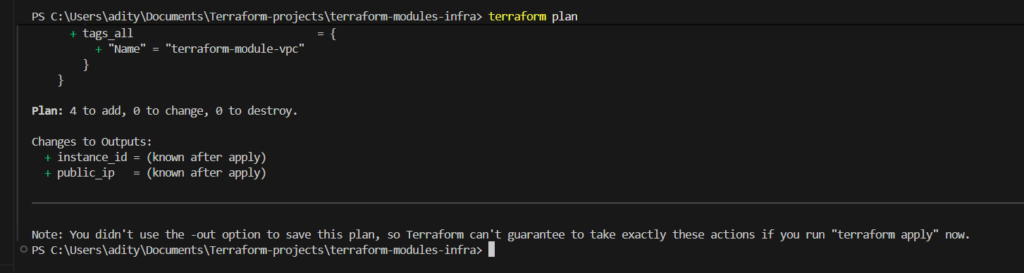
Once the plan looks correct, Terraform creates the infrastructure.
terraform apply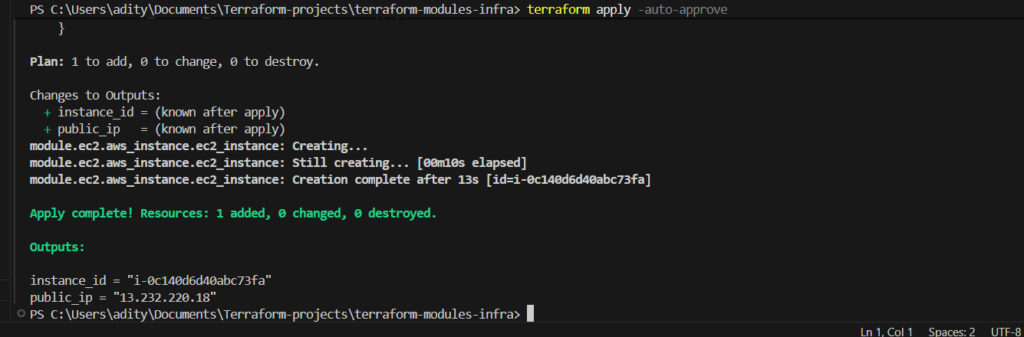
After the deployment finishes, Terraform outputs the EC2 instance’s public IP address.
Connecting to the EC2 Instance
SSH access becomes possible after the instance is created. Use the private key generated earlier to connect securely.
ssh -i terraform-newkey ubuntu@PUBLIC_IPOnce connected, the terminal should display the Ubuntu shell prompt.
ubuntu@ip-10-0-1-213:~$At this point, the infrastructure is fully operational and accessible.
Conclusion
Terraform modules provide a powerful way to structure Infrastructure as Code. Instead of managing a large configuration file, developers can break infrastructure into reusable components that improve clarity and scalability.
This implementation demonstrates how Terraform modules can organize AWS infrastructure while maintaining flexibility and maintainability. The project provisions networking resources, security configurations, and compute infrastructure through modular Terraform code. Furthermore, SSH access ensures that the instance can be managed immediately after deployment.
As infrastructure requirements grow, this modular design becomes even more valuable. Teams can extend the architecture by adding load balancers, auto scaling groups, or additional services without rewriting existing modules. Consequently, Terraform modules enable a scalable and maintainable approach to cloud infrastructure automation.
