
When deploying applications on Kubernetes, one of the biggest architectural challenges is handling application state, especially user sessions. Kubernetes is designed for stateless workloads, but most real-world applications are not completely stateless.
In this blog, I’ll walk through a real, end-to-end DevOps implementation where I:
- Deployed a Laravel application on Kubernetes
- Used Helm for reproducible deployments
- Integrated Redis as a centralized session store
- Configured Redis persistence using PVC
- Enabled Redis master–replica architecture
- Tested real production failure scenarios
This blog focuses on how production systems actually behave, not just how to deploy them successfully.
Problem Statement: Why File-Based Sessions Fail in Kubernetes
Laravel stores user sessions on the local filesystem by default. This approach works well in traditional single-server deployments. However, it fails in Kubernetes because Kubernetes is built for ephemeral and distributed workloads. Application pods can restart at any time. Kubernetes may also reschedule pods to different nodes or scale them horizontally based on traffic.
When Laravel stores session data inside a pod’s filesystem, the session becomes tied to that pod’s lifecycle. If Kubernetes restarts or replaces the pod, the session data disappears. This behavior causes unexpected user logouts and a poor user experience. The issue becomes more serious when multiple replicas run behind a load balancer. Each pod maintains its own local session storage. As a result, requests from the same user may hit different pods, which leads to session inconsistency and frequent logouts.
To fix this problem, session management needs to move outside the application pods. A centralized session store allows all application replicas to access the same session data. This design keeps sessions consistent, no matter which pod handles a request. The session store must also persist data independently of pod restarts to survive failures. Redis solves this problem effectively. It provides high performance, supports large concurrency, and works well as a distributed session store. By storing Laravel sessions in Redis instead of the pod filesystem, the application becomes stateless, scalable, and reliable in a Kubernetes environment.
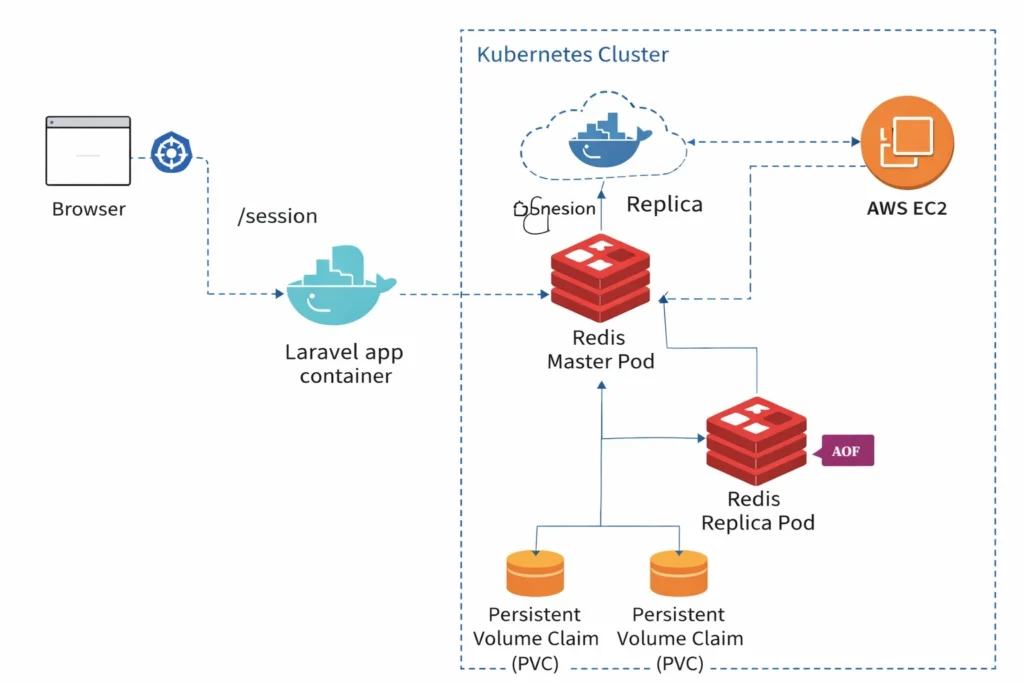
Architecture
End To End Implementation
Step 1: Containerizing the Laravel Application
A Dockerfile is used to package the Laravel application:
FROM php:8.1-apache

WORKDIR /var/www/html

RUN apt-get update && apt-get install -y \
    git unzip curl \
    libpng-dev libonig-dev libxml2-dev libzip-dev \
    && docker-php-ext-install pdo_mysql mbstring zip \
    && a2enmod rewrite

COPY . .
COPY --from=composer:2 /usr/bin/composer /usr/bin/composer

RUN composer install --no-interaction --optimize-autoloader
RUN chown -R www-data:www-data storage bootstrap/cache

EXPOSE 80
CMD ["apache2-foreground"]
The image is built and pushed to Docker Hub for Kubernetes consumption.
Step 2: Deploying Redis with Persistence & Replication (Helm)
Redis is deployed using the Bitnami Redis Helm chart, which provides production-ready defaults.
Redis Helm Values (redis-values.yaml)
architecture: replication

auth:
  enabled: true
  password: redis123

master:
  persistence:
    enabled: true
    size: 8Gi

replica:
  replicaCount: 2
  persistence:
    enabled: true
    size: 8Gi
Install Redis
helm install inventory-redis bitnami/redis \
  -n staging \
  -f redis-values.yaml
Result
- 1 Redis master pod
- 2 Redis replica pods
- 1 PVC per Redis pod
This ensures high availability and persistence.
Step 3: Deploying Laravel Using Helm
Laravel is deployed using a custom Helm chart.
Kubernetes Resources
- Deployment → Laravel application
- Service (NodePort) → External access
- Environment variables → Injected via Helm values
helm install inventory-app ./inventory-app -n staging
This allows clean upgrades and rollbacks.
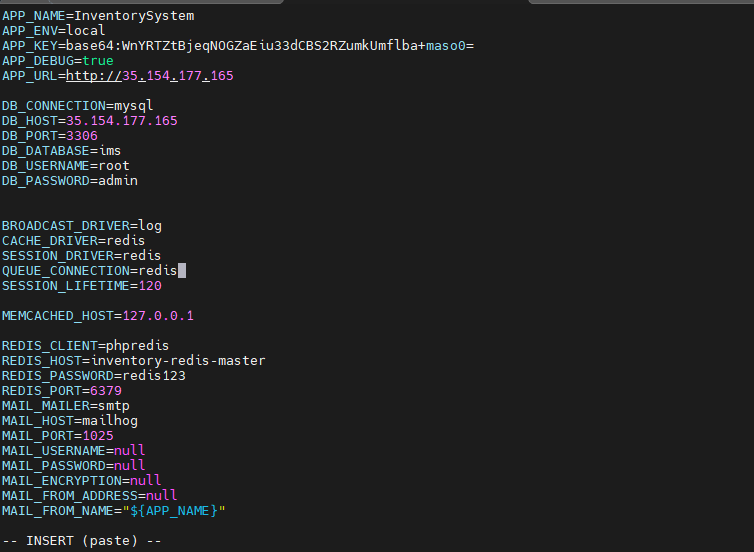
Step 4: Configuring Laravel to Use Redis Sessions
Laravel session configuration is injected via Helm, not hardcoded .env files.
SESSION_DRIVER=redis
CACHE_DRIVER=redis

REDIS_HOST=inventory-redis-master
REDIS_PORT=6379
REDIS_PASSWORD=redis123

SESSION_COOKIE=inventory_session
SESSION_SECURE_COOKIE=false
SESSION_SAME_SITE=lax
This makes the container immutable and environment-agnostic.
Step 5: Creating a Session Test Endpoint
To verify Redis-backed sessions, a test route is added:
Route::get('/session', function () {
    session(['test_session' => 'redis_is_working']);
    return response()->json([
        'message' => 'Session created',
        'value' => session('test_session'),
        'session_id' => session()->getId(),
    ]);
});
Access:
http://<EC2_PUBLIC_IP>:<NODE_PORT>/session
Step 6: Verifying Sessions Inside Redis
kubectl exec -it inventory-redis-master-0 -- redis-cli -a redis123
SCAN 0
GET <session-key>
TTL <session-key>
Confirmation
- Sessions are stored in Redis
- TTL is correctly applied
- Persistence is enabled via PVC
verify pvc is creted or not
kubectl get pvc -n staging
Step 7: Failure Testing (Real Production Scenarios)
Scenario 1: Application Pod Deletion
kubectl delete pod inventory-app-xxxxx
Result
- New pod is created automatically
- User remains logged in
- Session remains active
Reason:
Application pods are stateless; sessions live in Redis.
Scenario 2: Redis Master Pod Deletion
kubectl delete pod inventory-redis-master-0
Result
- Redis pod is recreated
- PVC is reattached
- Data still exists
Expected Behavior
- Some sessions may require re-login
- Redis restarts can invalidate in-memory session metadata
This is normal behavior and must be considered in production.
Conclusion
This end-to-end implementation demonstrates how to design and deploy a production-ready Laravel application on Kubernetes by following core cloud-native principles. By decoupling session management from application pods and using Redis as a centralized session store, the application achieves true statelessness, which is essential for scalability and resilience in Kubernetes environments. Helm simplifies deployments and configuration management, while Redis persistence through Persistent Volume Claims ensures that session data survives pod restarts and node failures.
Testing real failure scenarios plays a critical role in validating this architecture. Application pod deletion does not impact user sessions because Redis manages state externally. Redis pod restarts preserve data through PVC reattachment, although some session revalidation may occur, which is expected behavior in real-world systems. These tests highlight the importance of designing for failure rather than assuming ideal conditions.
Overall, this setup reflects how modern production systems operate on Kubernetes. It reinforces key DevOps concepts such as stateless application design, stateful service management, reproducible deployments, and failure-first thinking. Anyone learning Kubernetes or DevOps should go beyond successful deployments and actively test failure scenarios to truly understand system behavior under real production conditions.
