
Introduction to Container Management
In today’s fast-paced DevOps workflows, deploying applications reliably requires more than just code. Specifically, it needs efficient container management. Docker container registries make it possible to store, share, and deploy applications consistently across any environment.
A Docker image packages an application with all its dependencies. Consequently, it ensures the app runs the same everywhere. However, managing these images efficiently requires a centralized and secure storage solution. That is exactly where Docker container registries come into play. By exploring these platforms, I gained hands-on experience with storing and versioning images—a skill essential for team collaboration in real-world DevOps environments.
What is a Docker Container Registry?
A Docker container registry is a high-performance, centralized service used to store and distribute container images. It acts as the single “source of truth” for your software versions. Furthermore, it provides several key capabilities that streamline development:
- Automation: It integrates with CI/CD tools to trigger deployments the moment a new image arrives.
- Version Control: It uses “Tags” to maintain different builds, such as
:v1.0or:stable. - Security: It provides role-based access control (RBAC) and automated vulnerability scanning.
Top 4 Container Registries Compared
1.Docker Hub

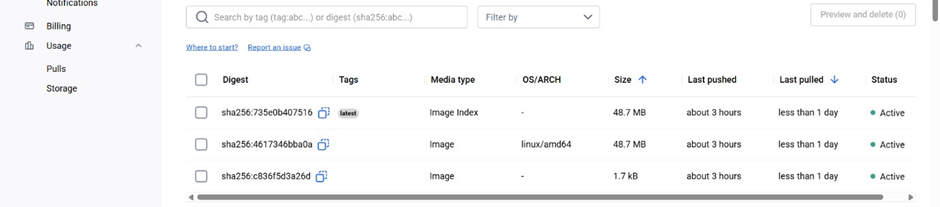
Docker Hub is the most widely used public Docker container registry. Because it is beginner-friendly, developers frequently use it for open-source projects. For more information, check out the official Docker documentation.
Common Commands:
# Log in to Docker Hub
docker login

# Tag your image
docker tag sample-app:1.0 username/sample-app:1.0

# Push the image to Docker Hub
docker push username/sample-app:1.0

# Pull the image from Docker Hub
docker pull username/sample-app:1.0
These commands allow you to authenticate, tag, push, and pull images from Docker Hub easily.
2.GitHub Container Registry (GHCR)

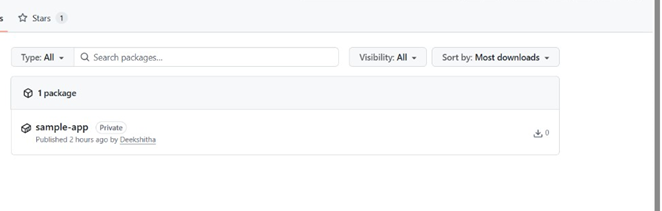
GitHub Container Registry allows you to store Docker images alongside your code. Consequently, it is perfect for teams already using GitHub for project management. If you missed my last post, see my guide on Automating GitHub Actions for better context.
3.GitLab Container Registry

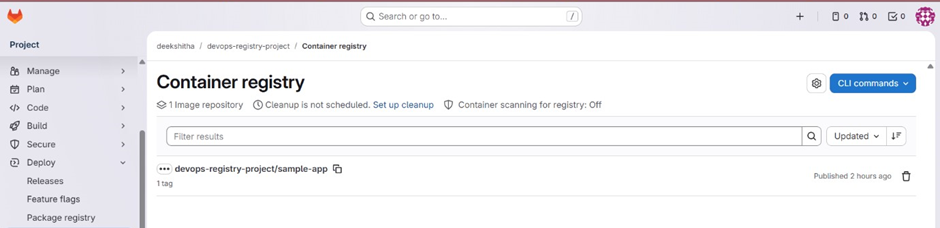
GitLab built this registry directly into its projects. As a result, it provides smooth image management within native GitLab CI/CD pipelines. In addition, it allows for secure, automated authentication during the build process.
How to Pull and Run Images from a Registry
Once images are stored in a registry, they can be pulled and run on any system with Docker installed.
Example:
# Pull the image from the registry
docker pull username/sample-app:1.0

# Run the container
docker run -d -p 80:80 username/sample-app:1.0
This ensures your image works correctly after retrieval from the registry.
4.Amazon Elastic Container Registry (AWS ECR)
For professional teams running on AWS, ECR is the enterprise choice. It is highly scalable and deeply integrated with services like ECS and EKS. Notably, the 2026 update introduced “Blob Mounting,” which significantly reduces storage costs and speeds up deployment times.
Pushing to AWS ECR (The Professional Choice)
Unlike other registries, ECR uses AWS IAM for security. You must authenticate via the AWS CLI first.
Bash
# 1. Authenticate (2026 CLI method)
aws ecr get-login-password --region us-east-1 | docker login --username AWS --password-stdin <aws_account_id>.dkr.ecr.us-east-1.amazonaws.com

# 2. Tag and Push
docker tag my-app:latest <aws_account_id>.dkr.ecr.us-east-1.amazonaws.com/my-app:latest
docker push <aws_account_id>.dkr.ecr.us-east-1.amazonaws.com/my-app:latest
Why Registries Matter in Real-World DevOps
In a professional setting, a registry isn’t just a “storage box”—it’s a security gate.
Efficiency: New features like Blob Mounting ensure that identical layers (like a Linux base OS) are only stored once, saving gigabytes of storage across large microservice architectures.
Vulnerability Scanning: Platforms like ECR and Docker Scout scan your images for security flaws before they ever reach the user.
Deployment Reliability: If a new version fails, a registry allows you to “Roll Back” to a previous stable tag in seconds.
Summary of Key Learnings
Through this exploration of container registries, I have mastered:
- Platform Diversity: Choosing the right tool (Docker Hub vs. GHCR vs. ECR) based on project needs.
- Security Best Practices: Implementing IAM-based access and vulnerability scanning.
- Automated Workflows: Using the Docker CLI to move images through the development lifecycle.
📊 Comparison Quick-Reference: Choosing the Right Registry
| Registry | Best For… | Authentication | Security Features | 2026 Key Feature |
| Docker Hub | Open Source & Personal Projects | Password / Personal Access Token | Docker Scout (Vulnerability Analysis) | Docker Build Cloud integration for faster remote builds. |
| GHCR (GitHub) | GitHub-native Workflows | GitHub PAT / Actions Token | Fine-grained Scopes (Linked to Repos) | Actions-Native Caching (zero-cost data transfer in CI). |
| GitLab Registry | GitLab CI/CD Users | Deploy Tokens / CI Job Tokens | Built-in Container Scanning (Ultimate Tier) | Integrated Package Registry (npm, Maven, Docker in one UI). |
| AWS ECR | AWS Cloud Infrastructure | AWS IAM (Roles/Policies) | Automated Scanning (Amazon Inspector) | Pull Through Cache (auto-sync images from public hubs). |
Conclusion:
Managing container registries is a fundamental skill for any DevOps engineer. By mastering these platforms, you ensure that your applications are not just “containerized,” but are secure, versioned, and ready for global scale.
