
Introduction: The End of “Server Babysitting”
In traditional DevOps, deploying a Laravel application often involves manual setup on an AWS EC2 Virtual Machine (VM). While this works initially, it creates a “fragile server” environment. If the PHP version on the host changes or a library is updated, the application often breaks. Furthermore, scaling these manual setups is nearly impossible.
To solve this, I migrated a VM-based Laravel app to Docker. This transition ensures the application is portable, isolated, and identical across development and production.
Why Migrate to Docker?
By containerizing the Laravel stack, we move away from managing “servers” and start managing “environments as code.”
- OS Independence: The app carries its own environment, eliminating OS-related bugs.
- Portability: Move from AWS to any other provider in minutes.
- Consistency: “It works on my machine” finally becomes a reality.
The Blueprint: Docker Architecture
The migration requires three core services: the Application (PHP), the Web Server (Nginx), and the Database (MySQL). We define these using two primary files.
1. The Dockerfile
The Dockerfile is our recipe. It builds a custom PHP-FPM environment and installs the extensions Laravel needs to
communicate with the database.
Dockerfile
FROM php:8.2-fpm

# Install system dependencies and PHP extensions
RUN apt-get update && apt-get install -y \
    libpng-dev libzip-dev zip unzip git curl
RUN docker-php-ext-install pdo_mysql gd zip

# Get latest Composer
COPY --from=composer:latest /usr/bin/composer /usr/bin/composer

WORKDIR /var/www
COPY . /var/www
RUN chown -R www-data:www-data /var/www
2. Docker Compose
The docker-compose.yml file acts as the orchestrator. It links our services together into a private network. Consequently, the app
service can reach the database using the hostname db instead of a local IP.
YAML
services:
  app:
    build: .
    container_name: laravel-app
    volumes:
      - .:/var/www
    networks:
      - laravel-net

  webserver:
    image: nginx:alpine
    ports:
      - "80:80"
    volumes:
      - .:/var/www
      - ./nginx/conf.d/:/etc/nginx/conf.d/
    networks:
      - laravel-net

  db:
    image: mysql:8.0
    environment:
      MYSQL_DATABASE: laravel
      MYSQL_ROOT_PASSWORD: secret
    networks:
      - laravel-net

networks:
  laravel-net:
    driver: bridge
The Migration Process: Step-by-Step
Step 1: Environment Preparation
I first stopped the manual Nginx service on the EC2 instance to clear Port 80. Then, I prepared the Laravel directory by adding the Docker configuration files.
Step 2: Launching the Stack
With the files in place, I executed the build command. As a result, Docker pulled the necessary images and built our custom PHP container.
Bash
docker-compose up -d --build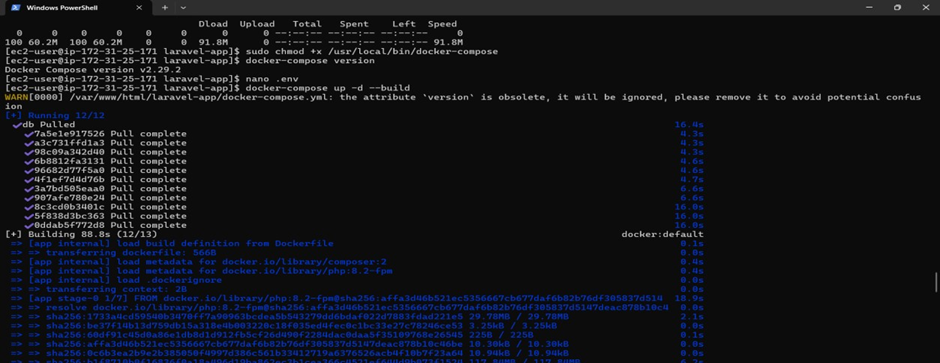
Step 3: Database Synchronization
Once the containers were “Up,” I ran the Laravel migrations inside the running container to set up the schema.
Bash
docker-compose exec app php artisan migrateApplication Access
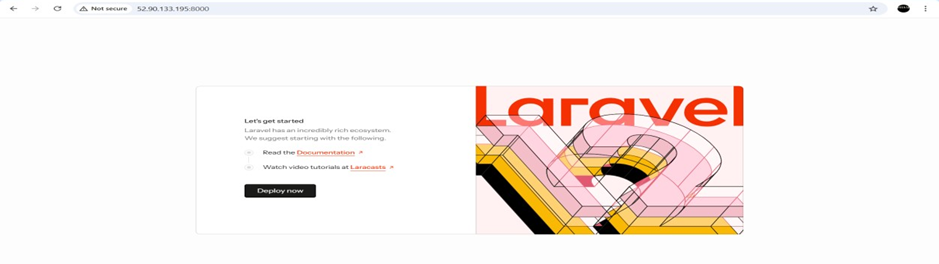
Once the migration was complete, the Laravel application became accessible using the same EC2 public IP address:
http://<EC2_PUBLIC_IP>
This confirmed that the Dockerized setup was working correctly in the cloud environment.
Conclusion
Migrating a Laravel application from a traditional EC2 VM setup to Docker eliminates manual server maintenance and configuration drift. By containerizing the application stack, we achieve portability, consistency, and scalability while simplifying deployment and future migrations.
This approach represents a modern DevOps mindset—treating infrastructure and environments as code—and forms a strong foundation for CI/CD pipelines and cloud-native application development.
