
Introduction
Modern applications must work across multiple Python versions. However, running tests one version at a time slows down development. Instead of waiting for sequential builds, you can execute tests in parallel using GitLab’s matrix strategy.
In this guide, you will learn how to configure parallel test execution for Python 3.8, 3.9, and 3.10 using GitLab CI/CD and an EC2 runner.
Why Parallel Test Execution Matters
Software teams often support multiple Python versions. If you test each version sequentially, your pipeline becomes slow and inefficient. As a result, developers wait longer for feedback.
Parallel execution solves this problem.
With a matrix strategy:
- Each Python version runs as a separate job
- All jobs execute at the same time
- Failures remain isolated
- Logs stay independent
Consequently, your CI pipeline becomes faster and more reliable.
Set Up an EC2 GitLab Runner
First, launch an Ubuntu EC2 instance.
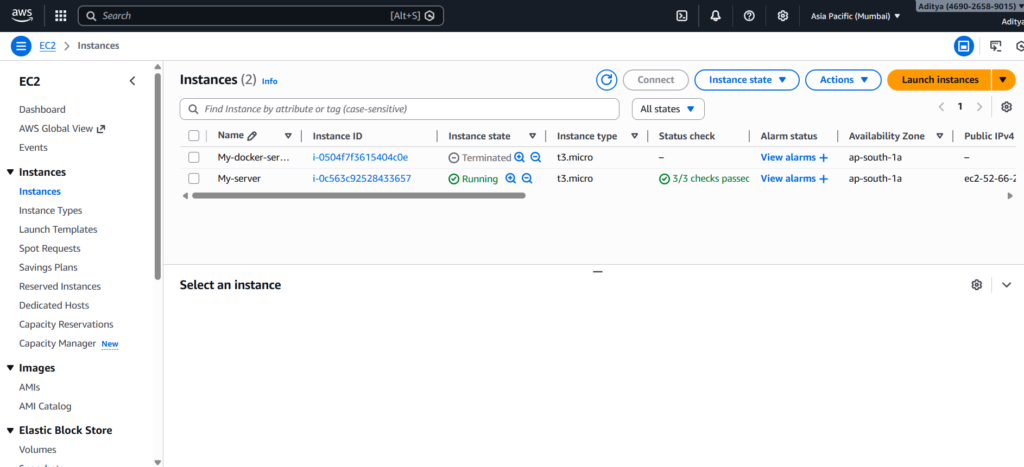
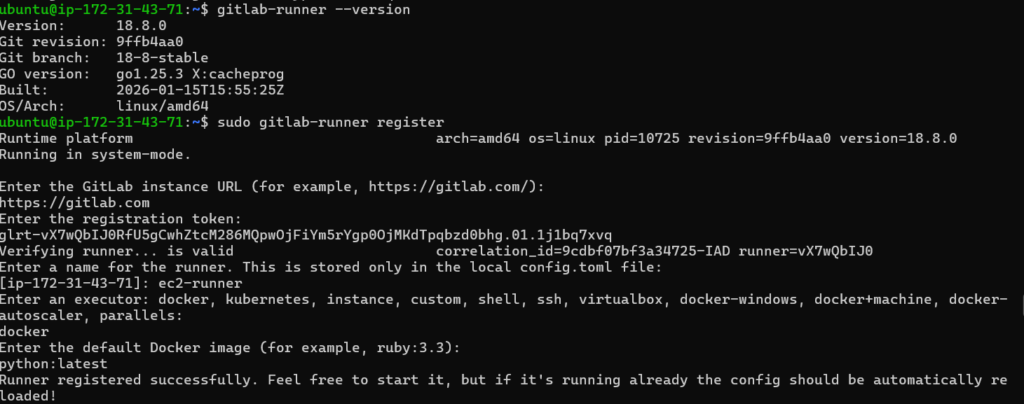
After connecting via SSH, install Docker and GitLab Runner.
Docker allows each job to use a different Python image. Meanwhile, GitLab Runner connects your EC2 machine to your GitLab project.
Once registered, ensure the runner uses the Docker executor.
Create a Sample Python Test Project
Next, create a simple project structure:
matrix-test/
│
├── test_sample.py
├── requirements.txt
└── .gitlab-ci.yml
Add pytest inside requirements.txt.
Then, create a simple test:
def test_addition():
    assert 1 + 1 == 2
This basic test helps validate the pipeline configuration.
Configure Matrix Strategy in GitLab CI
Now comes the most important part. Define your .gitlab-ci.yml file as follows:
stages:
  - test

test:
  stage: test
  image: python:${PYTHON_VERSION}
  tags:
    - ec2

  parallel:
    matrix:
      - PYTHON_VERSION: ["3.8", "3.9", "3.10"]

  before_script:
    - python --version
    - pip install -r requirements.txt

  script:
    - pytest
Here’s what happens:
- GitLab creates three separate jobs.
- Each job uses a different Python Docker image.
- All jobs run simultaneously.
- Every job reports its own pass or fail result.
Because of this setup, the pipeline completes much faster than a sequential configuration.
Push Code and Trigger the Pipeline
After committing your changes, push the code to the main branch. GitLab automatically triggers the pipeline on every push.
Inside the GitLab interface, navigate to:
CI/CD → Pipelines
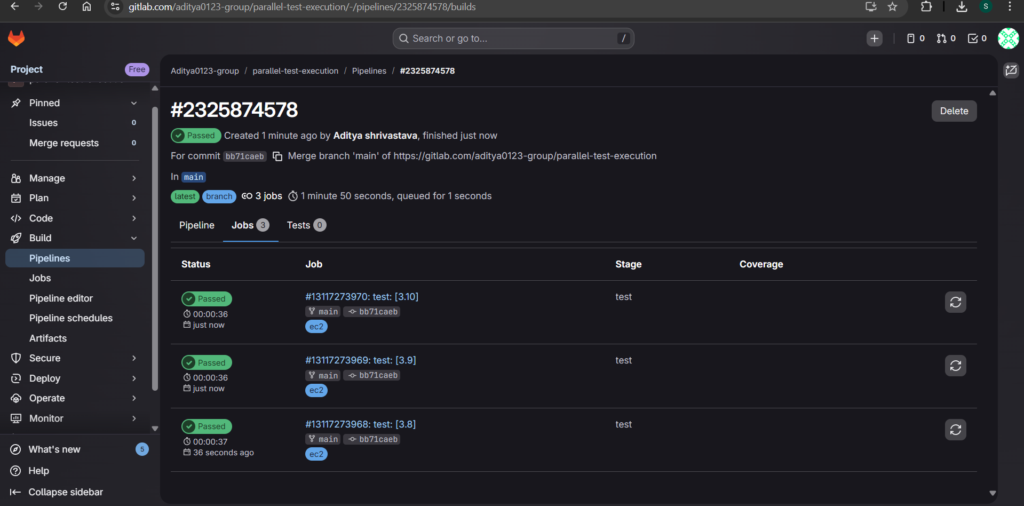
You should see:
- Three separate test jobs
- Python 3.8, 3.9, and 3.10
- Jobs running concurrently
- Independent logs
If all tests pass, your pipeline displays a green “Passed” status.
How to Verify Parallel Execution
Open the pipeline view and observe the job start times. When all jobs begin around the same time, parallel execution works correctly.
Additionally, click each job to confirm:
- The correct Python version appears in logs
- Dependencies install successfully
- Pytest executes without errors
This verification ensures the matrix strategy functions properly.
Common Mistakes to Avoid
Many developers accidentally configure only one Python version. Others forget to use the parallel: matrix keyword. Sometimes, the runner tag does not match the registered runner.
To prevent issues:
- Always define the matrix correctly
- Confirm runner tags
- Avoid sequential job definitions
- Ensure the pipeline triggers automatically
Careful validation saves debugging time later.
Final Thoughts
Parallel test execution dramatically improves CI/CD efficiency. Instead of waiting for multiple builds, you receive feedback from all Python versions at once.
By combining GitLab’s matrix strategy with an EC2 runner, you create a scalable and production-ready testing environment.
If you support multiple runtime versions, start using matrix pipelines today.
Conclusion
To sum up, parallel test execution with GitLab’s matrix strategy makes your CI/CD pipeline faster, cleaner, and more scalable. Instead of running tests sequentially, you validate multiple Python versions at the same time. As a result, you reduce feedback time and improve development speed.
Moreover, separate jobs provide independent logs and clear pass or fail results. This structure helps teams detect version-specific issues quickly. At the same time, Docker-based runners ensure consistency across environments.
Most importantly, this setup mirrors real-world DevOps practices. Production systems often support multiple runtime versions, so automated parallel testing becomes essential rather than optional.
Now that you understand how to configure matrix strategy on GitLab using an EC2 runner, you can extend this approach further. For example, you can add caching, coverage reports, multiple stages, or deployment workflows.
In short, parallel pipelines transform your testing process from slow and sequential to efficient and professional. Start using matrix builds today and strengthen your CI/CD foundation.
