
Introduction
Infrastructure as Code (IaC) is a DevOps practice that allows teams to manage and provision infrastructure using machine-readable configuration files. Instead of relying on manual cloud console setup, organizations automate infrastructure deployment through code. As a result, teams gain greater consistency, scalability, and operational efficiency across environments.
Over time, growing system complexity made infrastructure harder to maintain and replicate. Because of this, engineers adopted Infrastructure as Code to define and manage infrastructure programmatically.
One of the most widely used IaC tools is Terraform, developed by HashiCorp. For example, Terraform provisions cloud infrastructure in a consistent and predictable manner. Additionally, it supports automation across multiple environments and cloud providers.
In this guide, you will learn:
- What Infrastructure as Code (IaC) is
- Key benefits of adopting IaC
- Terraform vs other IaC tools
- Terraform architecture and workflow
- Installing Terraform
- Creating your first Terraform project
What is Infrastructure as Code (IaC)?
Infrastructure as Code (IaC) is the practice of managing and provisioning IT infrastructure using machine-readable configuration files. Instead of relying on manual processes, graphical interfaces, or ad-hoc commands, teams automate infrastructure through code. As a result, infrastructure management becomes more structured and predictable.
Traditionally, teams provisioned servers, configured networks, attached storage, and set up security rules through cloud dashboards or command-line tools. Although this approach may work initially, it becomes difficult to manage as systems scale. Over time, manual processes create inconsistencies, configuration drift, and deployment delays. Consequently, teams struggle to maintain control across environments.
Infrastructure as Code solves these challenges by allowing teams to define infrastructure declaratively in configuration files. In other words, the files describe the desired system state, and automation tools enforce it consistently. Therefore, organizations gain greater reliability, scalability, and operational efficiency.
Traditional Infrastructure Provisioning
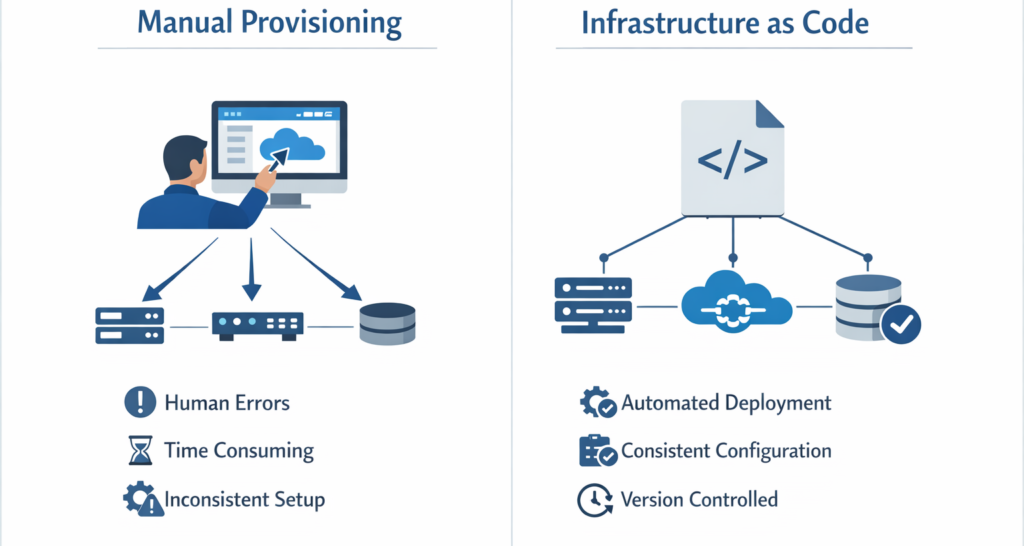
Before organizations adopted Infrastructure as Code, teams typically provisioned infrastructure manually through cloud management consoles. As a result, the process depended heavily on human intervention.
This process often involved:
- Logging into a cloud console
- Navigating through multiple configuration screens
- Selecting instance types and storage options manually
- Configuring networking and security groups
- Repeating the same setup steps for each environment
Although this approach may seem straightforward at first, it creates significant operational challenges as infrastructure begins to scale. Consequently, teams often struggle to maintain consistency and control across environments.
Problems with Manual Infrastructure Management
In practice, manual provisioning often leads to several critical issues. For example, teams may encounter inconsistencies, configuration drift, and deployment delays.
Human Errors – Minor configuration mistakes can lead to serious production incidents.
Inconsistent Configurations – Development, staging, and production environments may differ slightly, causing unexpected behavior.
Limited Scalability – Recreating infrastructure manually for scaling requires significant time and effort.
Lack of Version Control – Infrastructure changes are not systematically tracked or reviewed.
Configuration Drift – Over time, infrastructure may deviate from its original configuration without proper documentation.
As organizations increasingly adopt cloud platforms such as Amazon Web Services, Microsoft Azure, and Google Cloud, infrastructure naturally becomes more dynamic and continuously evolving. Consequently, teams must manage frequent changes, scaling demands, and configuration updates more efficiently. Manual processes are unable to keep pace with this level of change.
How Infrastructure as Code Solves These Problems
Infrastructure as Code addresses the limitations of manual provisioning by defining infrastructure through configuration files written in a declarative language.
Instead of manually navigating dashboards and configuring resources step by step, teams can define infrastructure through code. As a result, deployments become faster, more consistent, and easier to manage.
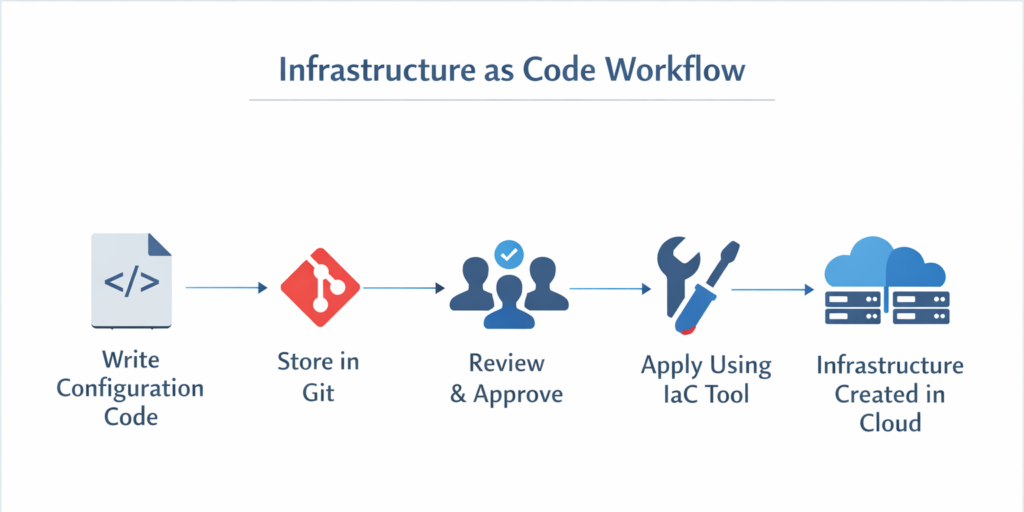
- Infrastructure is defined in code files
- Code is stored in version control systems such as Git
- Changes are reviewed before deployment
- Infrastructure is provisioned automatically using IaC tools
- Entire environments can be replicated consistently
This approach introduces software development principles—such as automation, version control, and peer review—into infrastructure management. As a result, infrastructure becomes predictable, scalable, and easier to maintain.
Core Principles of IaC
Infrastructure as Code is built upon the following foundational principles:
Automation – Infrastructure is provisioned automatically without manual intervention.
Consistency – Every environment is created using the same configuration files, eliminating mismatches.
Repeatability – Infrastructure can be recreated at any time using the same codebase.
Version Control – All infrastructure changes are tracked, reviewed, and auditable.
Documentation Through Code – Configuration files act as living documentation of the infrastructure.
Benefits of Infrastructure as Code
Implementing Infrastructure as Code (IaC) provides measurable operational and business advantages. As infrastructure becomes increasingly dynamic in cloud environments, automation, consistency, and scalability become critical.
Below are the major benefits of adopting IaC:
1. Consistency
Every environment—development, staging, and production—is created using the same configuration files.
This ensures:
- No configuration mismatch between environments
- Reduced deployment failures
- Standardized infrastructure patterns
Consistency eliminates the common issue of “it works in development but fails in production.”
2. Speed
Infrastructure can be provisioned within minutes using automated commands.
Instead of manually configuring servers and repeating setup steps, engineers can execute:
terraform apply
This significantly reduces provisioning time and accelerates project delivery.
3. Version Control
Infrastructure configurations are stored in version control systems such as Git.
This enables teams to:
- Track every infrastructure change
- Review modifications before deployment
- Roll back to previous versions if necessary
Version control introduces transparency, collaboration, and accountability into infrastructure management.
4. Reduced Human Error
Automation minimizes manual configuration mistakes.
Manual provisioning frequently results in:
- Incorrect security group rules
- Improper instance configurations
- Missing or inconsistent settings
With IaC, validated configurations are reused consistently, reducing unexpected production issues.
5. Scalability
Infrastructure can be replicated across:
- Multiple regions
- Multiple environments
- Multiple business units or clients
Scaling becomes a controlled configuration change rather than a repetitive manual process.
There are several Infrastructure as Code (IaC) tools available in the industry. Some of the most widely used options include:
- Terraform
- AWS CloudFormation
- Ansible
- Pulumi
Although all these tools aim to automate infrastructure management, they differ significantly in architecture, cloud support, language, and state management.
Key Differences Between Terraform and Other IaC Tools
In the realm of Infrastructure as Code (IaC), tools like Terraform, CloudFormation, and Ansible play a crucial role in automating cloud infrastructure management. Each of these tools serves slightly different purposes and has unique features that make them suitable for specific use cases.
Terraform, developed by HashiCorp, is a powerful multi-cloud provisioning tool that uses HCL (HashiCorp Configuration Language) to declaratively define infrastructure. One of its key advantages is state management: Terraform maintains a record of the current infrastructure, allowing it to detect differences between the existing and desired state. This enables safe creation, updates, and deletion of resources across multiple cloud providers, including AWS, Azure, and GCP.
CloudFormation is Amazon’s native IaC solution, using JSON or YAML templates to define AWS resources. It is tightly integrated with AWS, meaning it cannot manage resources outside the AWS ecosystem. CloudFormation also tracks resource states automatically, providing a managed approach to infrastructure provisioning for teams working exclusively on AWS.
Ansible, in contrast, focuses primarily on configuration management, deployment automation, and task orchestration rather than full lifecycle infrastructure provisioning. Using YAML playbooks, Ansible can install software, configure servers, and deploy applications across multiple environments. While it supports provisioning cloud resources, it does not maintain a persistent state like Terraform, and it requires an agent or SSH access to target systems. Its flexibility makes it suitable for operational automation both in the cloud and on-premises.
In summary, Terraform excels in declarative, multi-cloud infrastructure management with strong state tracking, CloudFormation is ideal for AWS-only infrastructure management, and Ansible is best suited for configuration and automation tasks on existing servers or infrastructure.
Comparison Table of Terraform, CloudFormation, and Ansible
| Feature | Terraform | CloudFormation | Ansible |
|---|---|---|---|
| Primary Use | Infrastructure provisioning across multiple clouds | AWS infrastructure provisioning only | Configuration management, deployment, and automation |
| Supported Clouds | AWS, Azure, GCP, and more | AWS only | Multi-cloud & on-premises |
| Language | HCL (HashiCorp Configuration Language) | JSON / YAML | YAML |
| State Management | Yes – maintains a state file to track resources | Managed automatically by AWS | Limited – no persistent state |
| Agent Requirement | None – communicates directly with cloud APIs | None – managed by AWS | Requires SSH or agents to connect to target nodes |
| Change Planning | Yes – terraform plan previews changes before applying | Limited – changes applied directly | No native plan; changes executed when playbook runs |
How Terraform Compares
First, Terraform supports multi-cloud environments, which allows teams to manage infrastructure across AWS, Azure, and Google Cloud using a single workflow. In contrast, CloudFormation is tightly integrated with AWS and cannot manage resources outside the AWS ecosystem.
Second, Terraform uses HashiCorp Configuration Language (HCL), which is designed to be human-readable and declarative. Meanwhile, CloudFormation relies on JSON or YAML templates, which can become complex in large deployments.
Additionally, Terraform maintains a state file that tracks infrastructure changes. This feature enables precise updates and controlled modifications. Ansible, on the other hand, has limited native state management because it was originally designed for configuration management rather than full infrastructure provisioning.
Finally, Terraform does not require agents on managed systems. Ansible typically relies on agent-based or SSH-based execution, depending on the setup.
Why Terraform Is Widely Adopted
Modern DevOps teams widely adopt Terraform because it simplifies infrastructure management across environments.
One major advantage is multi-cloud support. Teams can manage resources across different cloud providers using a single tool.
In addition, Terraform uses HashiCorp Configuration Language (HCL). The syntax remains clean, readable, and easy to maintain, which improves collaboration.
Another important feature is the state file. This file tracks infrastructure changes and ensures consistency between configuration and actual cloud resources.
Unlike imperative tools, Terraform follows a declarative model. Engineers define the desired outcome, and the tool determines how to reach that state.
Furthermore, a strong open-source community and enterprise ecosystem support continuous improvements. Because of these strengths, many organizations integrate Terraform directly into CI/CD pipelines and use it in production environments.
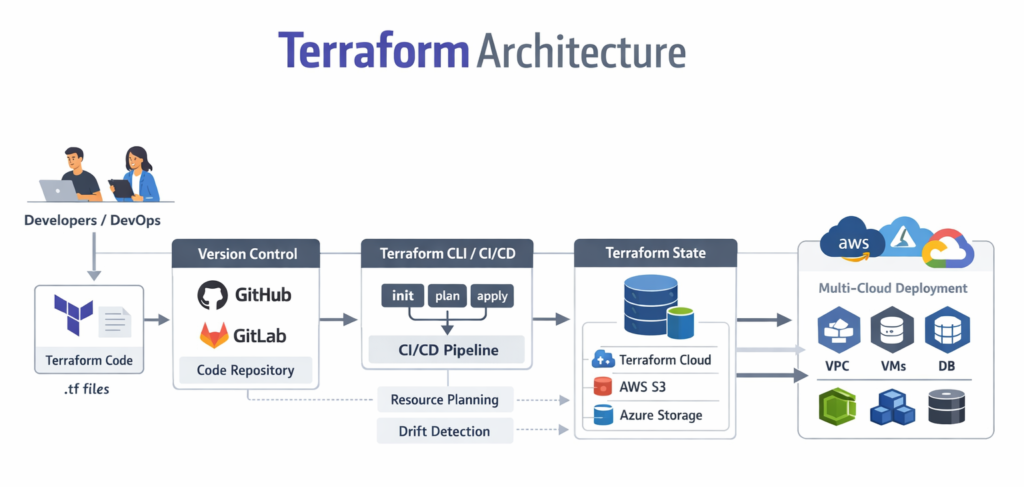
Terraform Architecture
Understanding Terraform’s architecture helps engineers design infrastructure more effectively and troubleshoot issues efficiently.
Terraform consists of three primary components:
1. Terraform Core
Terraform Core is the main engine responsible for:
- Reading configuration files
- Building an execution plan
- Determining resource dependencies
- Managing the state file
It compares the desired state (defined in configuration files) with the current state (stored in the state file) and determines the required changes.
2. Providers
Providers are plugins that allow Terraform to interact with cloud platforms such as:
- Amazon Web Services
- Microsoft Azure
- Google Cloud
Each provider translates Terraform configurations into API calls for the respective platform.
3. State File
Terraform stores infrastructure details in:
terraform.tfstate
The state file tracks:
- Created resources
- Current infrastructure configuration
- Resource dependencies
- Metadata
This ensures Terraform knows what already exists and what requires modification.
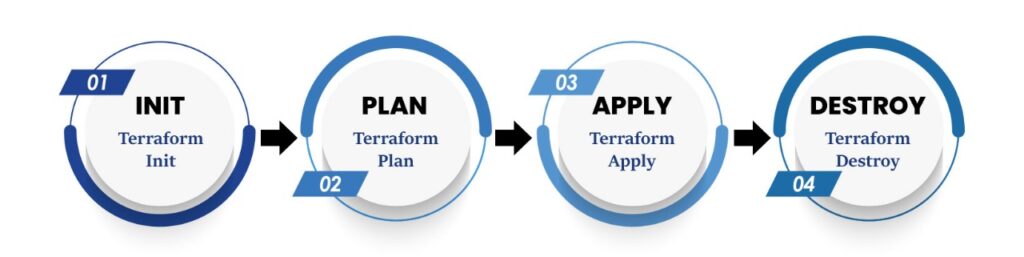
Terraform Workflow
Terraform follows a structured and predictable workflow:
Step 1: Write Configuration Files (.tf)
Define infrastructure using HCL. This typically includes:
- Provider configuration
- Resource definitions
- Variables
Step 2: Initialize Terraform
terraform init
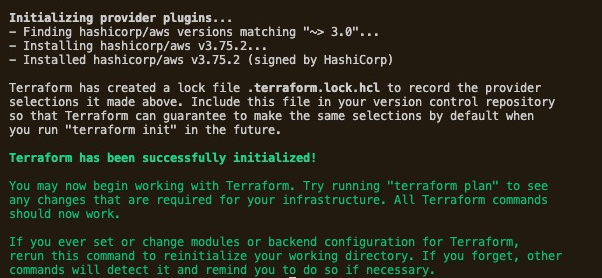
This command:
- Downloads required provider plugins
- Initializes the working directory
- Prepares Terraform for execution
Step 3: Preview Changes
terraform plan
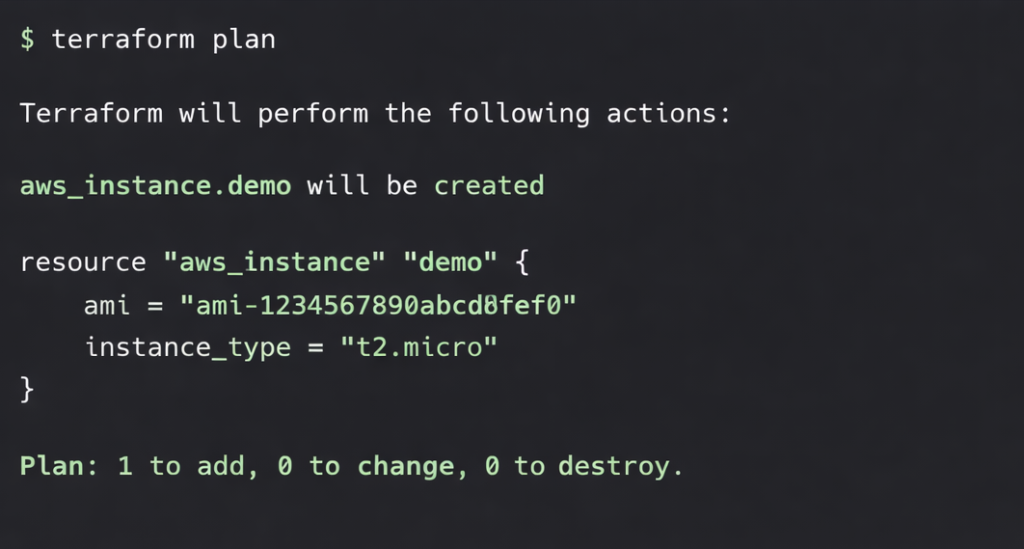
This command:
- Shows resources to be created
- Displays modifications
- Identifies deletions
It acts as a safety check before applying changes.
Step 4: Apply Configuration
terraform apply
Terraform executes the planned changes and provisions infrastructure.
Step 5: Destroy (Optional)
terraform destroy
This command removes all Terraform-managed infrastructure resources.
Installing Terraform
Terraform can be installed on Windows, Linux, and macOS.
For Windows:
- Download from the official Terraform website
- Extract the ZIP file
- Add Terraform to the system PATH
For Linux (Ubuntu Example):
sudo apt update
sudo apt install terraform
Verify installation:
terraform -version
Successful installation will display the installed version.
Prerequisites Before Creating Resources
Configuring AWS Credentials
Before provisioning infrastructure using Terraform, authentication with Amazon Web Services is required. Terraform must have valid AWS credentials to create and manage cloud resources.
There are two common approaches to configure AWS credentials.
Method 1: Adding Credentials in the Terraform Provider Block (For Demonstration Purposes Only)
In this approach, AWS credentials are specified directly inside the Terraform configuration file.
provider "aws" {
  region     = "ap-south-1"
  access_key = "YOUR_ACCESS_KEY"
  secret_key = "YOUR_SECRET_KEY"
}
Limitations:
- Credentials are stored in plain text
- Security risk if pushed to GitHub
- Not suitable for production environments
This method is sometimes used for learning purposes but is not recommended for real-world implementations.
Method 2: Configuring Credentials Using AWS CLI (Recommended Approach)
A more secure and industry-standard method is configuring credentials using the AWS CLI.
Run:
aws configure
You will be prompted to enter:
AWS Access Key ID [None]: YOUR_ACCESS_KEY
AWS Secret Access Key [None]: YOUR_SECRET_KEY
Default region name [None]: ap-south-1
Default output format [None]: json
The credentials are securely stored in:
~/.aws/credentials
~/.aws/config
Terraform automatically reads credentials from these files during execution.
Why This Method Is Recommended:
- Credentials are not stored in source code
- Safer for collaboration
- Suitable for CI/CD pipelines
- Follows DevOps security best practices
First Terraform Project (EC2 Example)
Now let’s provision a simple EC2 instance. Step by step;
1: Create Project Folder
mkdir terraform-demo
cd terraform-demo
2: Create main.tf
provider "aws" {
  region = "ap-south-1"
}

resource "aws_instance" "demo" {
  ami           = "ami-xxxxxxxx"
  instance_type = "t2.micro"
}
Replace the AMI ID with a valid ID for your region.
3: Initialize the Project
terraform init
4: Review the Execution Plan
terraform plan
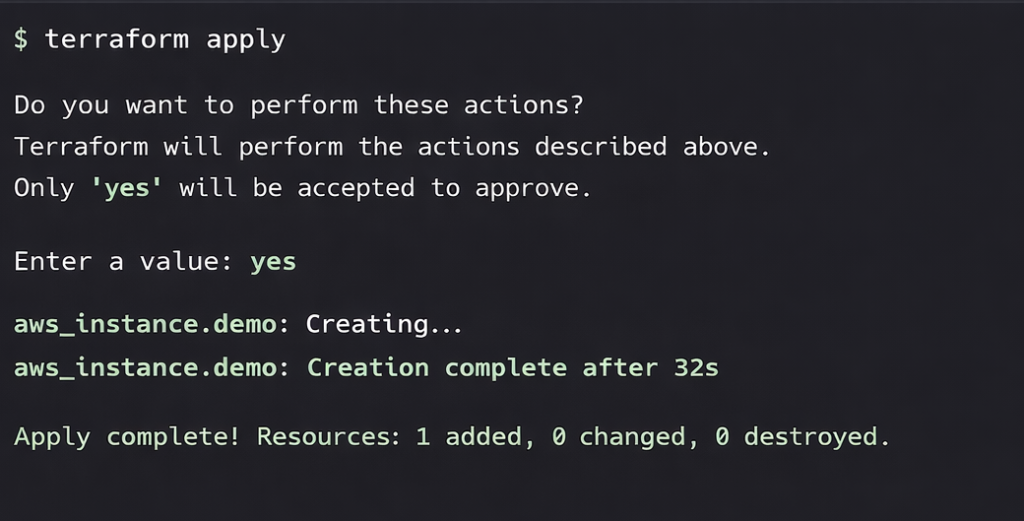
5: Apply the Configuration
terraform apply
Type yes when prompted.
Terraform will create the EC2 instance automatically.
Best Practices for Beginners
When starting with Terraform, following best practices from the beginning can help you avoid common pitfalls and ensure a secure, maintainable, and scalable infrastructure setup. One of the first practices is to use input variables instead of hardcoding values. This allows you to easily customize configurations for different environments without changing the code. For production environments, it’s important to store the Terraform state remotely (for example, in Terraform Cloud, AWS S3, or Azure Storage) to enable collaboration, maintain state consistency, and prevent accidental overwrites.
Version control is essential, so always use Git to manage your Terraform code. This not only helps track changes but also enables team collaboration and rollback in case of errors. Security should also be a priority: apply least-privilege IAM permissions to Terraform users and roles, ensuring that your infrastructure only has access to what it needs. For better organization and risk management, maintain separate environments such as development, staging, and production, each with its own configuration and state. Lastly, use a .gitignore file to exclude sensitive files like local state files or credential files from your repository to prevent unintentional exposure of secrets.
By following these practices, beginners can build a solid foundation for managing infrastructure efficiently and safely with Terraform.
Key Points
- Use input variables instead of hardcoding values.
- Store Terraform state remotely for production environments.
- Use Git for version control and collaboration.
- Apply least-privilege IAM permissions for security.
- Maintain separate environments (dev, staging, prod).
- Use .gitignore to exclude sensitive files from repositories.
Conclusion
Infrastructure as Code (IaC) has fundamentally transformed cloud infrastructure management.
By adopting IaC practices and tools like Terraform, organizations gain:
- Automation
- Reliability
- Scalability
- Operational efficiency
Mastering Terraform fundamentals is an essential skill for DevOps and Cloud Engineers. As cloud environments continue to grow in complexity, Infrastructure as Code becomes not just an advantage, but a necessity.
