
Introduction
Modern cloud infrastructure demands automation, consistency, and scalability. Manual provisioning through the AWS console increases human error and makes environments difficult to reproduce. Infrastructure as Code solves this problem by allowing engineers to define cloud resources in code.
In this guide, we will build AWS infrastructure using Terraform with a modular architecture. The project provisions an Amazon S3 bucket through a custom module and launches an EC2 instance using the official Terraform AWS EC2 module. This setup demonstrates Terraform modules, Infrastructure as Code best practices, AWS resource provisioning, and reusable architecture design.
Why Use Terraform Modules?
Terraform modules improve code organization and long-term maintainability. Instead of writing everything in one large configuration file, modules allow you to group related resources together and reuse them across projects.
A modular approach ensures that teams can maintain separate components independently. It also improves readability and makes collaboration easier. When infrastructure grows, modular architecture prevents chaos.
Project Architecture Overview
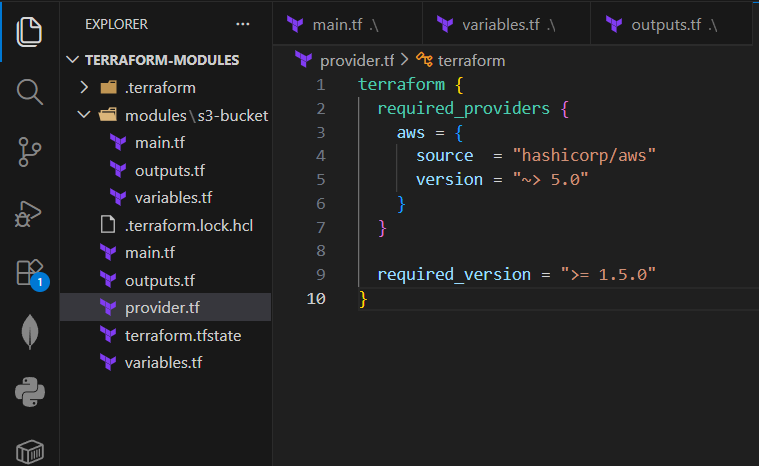
terraform-aws-modular/
│
├── main.tf
├── provider.tf
├── variables.tf
├── outputs.tf
│
└── modules/
    └── s3-bucket/
        ├── main.tf
        ├── variables.tf
        └── outputs.tf
The project structure separates the root configuration from reusable modules. The root configuration calls two modules: a custom S3 module and the official EC2 module from the Terraform registry.
The root directory contains provider configuration, variables, outputs, and module calls. Inside the modules folder, the custom S3 module contains its own main file, variables, and outputs. This structure ensures clear separation of responsibilities.
Configuring the AWS Provider
Terraform must know which provider to use and which version to lock. Version pinning prevents unexpected compatibility issues.
Create provider.tf:
terraform {
  required_providers {
    aws = {
      source  = "hashicorp/aws"
      version = "~> 5.0"
    }
  }
required_version = ">= 1.5.0"
}
provider "aws" {
  region = var.aws_region
}
Now define the root variables in variables.tf:
variable "aws_region" {
  description = "AWS region"
  type        = string
  default     = "ap-south-1"
}
variable "instance_type" {
  description = "EC2 instance type"
  type        = string
  default     = "t2.micro"
}
variable "ami_id" {
  description = "Custom AMI ID for EC2"
  type        = string
}
This setup ensures stability and flexibility across environments.
Create a Custom S3 Bucket Module
A reusable S3 module improves maintainability. Instead of rewriting bucket configuration in every project, you define it once and reuse it.
Inside modules/s3-bucket/main.tf:
resource "aws_s3_bucket" "mys3bucket" {
  bucket = var.bucket_name  tags = {
    Name        = var.bucket_name
    Environment = var.environment
  }
}
resource "aws_s3_bucket_versioning" "versioning" {
  bucket = aws_s3_bucket.mys3bucket.id  versioning_configuration {
    status = "Enabled"
  }
}
Define module variables in modules/s3-bucket/variables.tf:
variable "bucket_name" {
  description = "Name of the S3 bucket"
  type        = string
}
variable "environment" {
  description = "Environment name"
  type        = string
}
Expose outputs in modules/s3-bucket/outputs.tf:
output "bucket_id" {
  value = aws_s3_bucket.mys3bucket.id
}
output "bucket_arn" {
  value = aws_s3_bucket.mys3bucket.arn
}
Versioning protects files from accidental deletion, which follows Infrastructure as Code best practices.
Use the Official EC2 Module
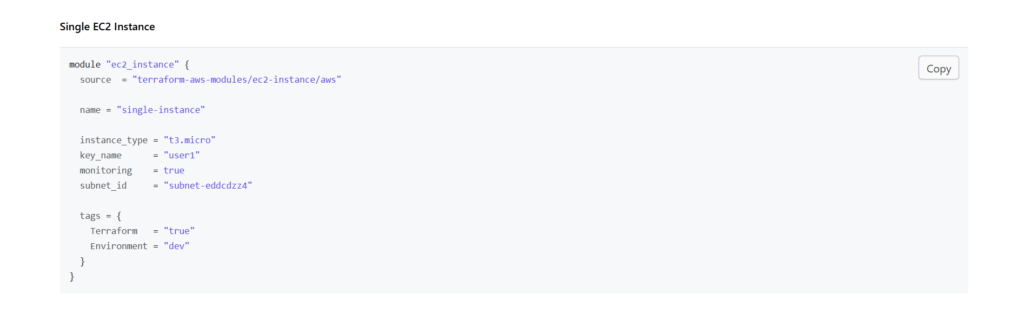
Instead of writing EC2 configuration from scratch, you can use the official Terraform AWS EC2 module. Using trusted registry modules reduces development time and increases reliability.
Add this to your root main.tf:
module "s3_bucket" {
  source      = "./modules/s3-bucket"
  bucket_name = "my-terraform-demo-bucket-12345"
  environment = "dev"
}
module "ec2_instance" {
  source  = "terraform-aws-modules/ec2-instance/aws"
  version = "~> 5.0"  name          = "terraform-instance"
  instance_type = var.instance_type
  ami           = var.ami_id
tags = {
    Terraform   = "true"
    Environment = "dev"
  }
}
Pinning the module version ensures compatibility with the AWS provider. After adding the version constraint, the deployment worked successfully without additional subnet or IAM adjustments.
Define Root Outputs
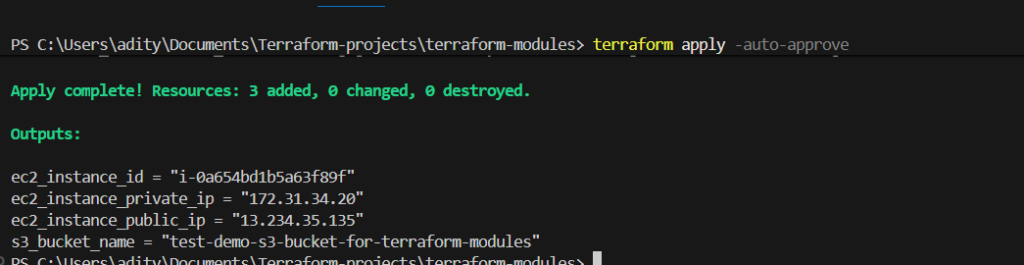
Outputs confirm that Terraform created resources successfully.
Add this to outputs.tf:
output "s3_bucket_name" {
  value = module.s3_bucket.bucket_id
}
output "ec2_instance_id" {
  value = module.ec2_instance.id
}
output "ec2_public_ip" {
  value = module.ec2_instance.public_ip
}
These outputs improve visibility and debugging.
Configure IAM for Terraform
Terraform needs programmatic AWS access. Create a dedicated IAM user and attach appropriate permissions such as EC2 and S3 access. Always follow the principle of least privilege in production environments.
Export credentials securely:
export AWS_ACCESS_KEY_ID="your-access-key"
export AWS_SECRET_ACCESS_KEY="your-secret-key"
Avoid hardcoding credentials inside Terraform files.
Deploy the Infrastructure
Initialize and deploy using:
terraform init
terraform validate
terraform plan
terraform apply
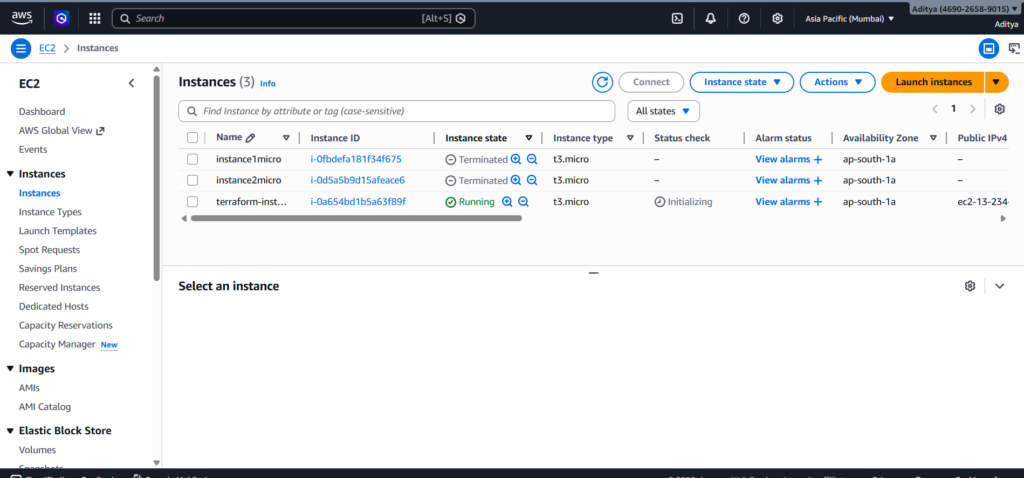
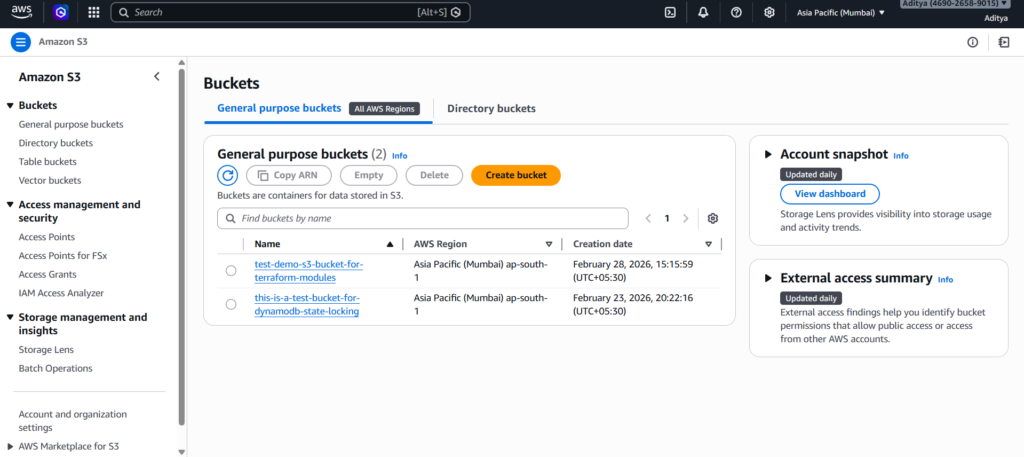
Terraform will provision:
- An S3 bucket with versioning enabled
- An EC2 instance using your custom AMI
The entire infrastructure becomes reproducible and maintainable.
Why Modular Terraform Architecture Matters
Modular design reduces duplication and improves scalability. Version pinning prevents unexpected breaking changes. Variables improve portability across regions. Outputs enhance visibility between modules.
This project reflects real-world DevOps practices rather than basic tutorial setups. By combining custom modules and official registry modules, you create reusable and production-ready infrastructure.
Conclusion
Building AWS infrastructure using Terraform modules demonstrates how Infrastructure as Code transforms cloud provisioning into a structured, repeatable, and scalable process. By creating a custom S3 bucket module, you learned how to design reusable components that separate logic from implementation. By integrating the official EC2 module with proper version pinning, you ensured stability and avoided compatibility issues that often appear in unmanaged setups.
This project highlights the importance of modular architecture in real-world DevOps environments. Clear variable definitions improve flexibility, outputs enhance visibility, and version constraints protect your infrastructure from unexpected breaking changes. Instead of relying on manual AWS console configuration, you now control infrastructure through clean, maintainable code.
Reusable Terraform modules not only simplify deployments but also make collaboration easier for teams working across multiple environments. The ability to define once and reuse everywhere reflects production-grade Infrastructure as Code practices. With proper IAM configuration and secure credential management, the entire setup becomes both scalable and secure.
By combining custom modules, official registry modules, version control, and structured project organization, you built infrastructure that aligns with industry standards. This approach prepares you for real DevOps workflows where automation, reliability, and maintainability matter most.
If you continue expanding this architecture by adding remote backends, environment separation, or CI/CD integration, you will move even closer to a fully production-ready cloud infrastructure system.
