
Introduction
In this comprehensive tutorial, you’ll learn how to build a production-ready static website infrastructure on AWS using Terraform modules. Moreover, we’ll create a scalable, secure, and reusable infrastructure that follows industry best practices. As a result, you’ll have a professional deployment system that can be used across multiple projects.
What We’ll Build
First, let’s look at the core components we’ll be deploying. Our infrastructure includes three essential elements that work together seamlessly:
- S3 Bucket: Initially, this will host your static website files including HTML, CSS, JavaScript, and images
- CloudFront Distribution: Subsequently, this provides global content delivery with HTTPS encryption for fast load times
- Modular Architecture: Finally, this creates reusable Terraform modules for easy maintenance and updates
Prerequisites
Before starting, however, you’ll need to ensure the following requirements are in place:
- AWS Account with appropriate IAM permissions for S3, CloudFront, and resource management
- Terraform installed (version 1.0 or higher) on your local machine
- Basic understanding of AWS services, particularly S3 storage and CloudFront CDN
- AWS CLI configured with valid credentials for deployment
Architecture Overview
Now, let’s examine how our infrastructure is organized. Essentially, the system is built on three interconnected components:
Component 1: S3 Static Site Module
First and foremost, the S3 Static Site Module handles all storage-related tasks. Specifically, it manages bucket creation, website configuration, and automated file uploads with proper MIME type detection. Additionally, it ensures your content is stored securely and efficiently.
Component 2: CloudFront Distribution Module
Next, the CloudFront Distribution Module handles content delivery. In particular, it manages CDN setup with Origin Access Control (OAC) for secure distribution. Furthermore, it configures global edge caching to minimize latency for users worldwide.
Component 3: Root Configuration
Finally, the Root Configuration orchestrates both modules. Importantly, it creates the S3 bucket policy that enables CloudFront to securely access your content. At the same time, it blocks direct public access to maintain security.
Why This Architecture?
Consequently, this modular approach delivers significant advantages:
- Modularity: First, each component is isolated and reusable. Therefore, you can deploy the same modules across different projects without code duplication
- Security: Additionally, it implements Origin Access Control (OAC) instead of the deprecated Origin Access Identity. As a result, your content remains protected from unauthorized access
- Performance: Moreover, CloudFront’s global caching network reduces latency significantly. Thus, content is served from edge locations closest to your users
- Best Practices: Furthermore, it follows both Terraform module design patterns and AWS Well-Architected Framework recommendations. Consequently, you get reliability and maintainability built-in
Project Structure
terraform-static-site-modules/
├── main.tf                          # Root configuration
├── variables.tf                     # Root variables
├── outputs.tf                       # Root outputs
├── website/                         # Website files
│   ├── index.html
│   ├── error.html
│   └── style.css
└── modules/
    ├── s3_static_site/              # S3 module
    │   ├── main.tf
    │   ├── variables.tf
    │   └── outputs.tf
    └── cloudfront_distribution/     # CloudFront module
        ├── main.tf
        ├── variables.tf
        └── outputs.tf
Step 1: S3 Static Site Module
Purpose
This module creates an S3 bucket, configures it for static website hosting, and uploads website files.
modules/s3_static_site/main.tf
# S3 Bucket
resource "aws_s3_bucket" "this" {
  bucket = var.bucket_name

  tags = {
    Name        = var.project_name
    Environment = var.environment
  }
}

# S3 Website Configuration
resource "aws_s3_bucket_website_configuration" "this" {
  bucket = aws_s3_bucket.this.id

  index_document {
    suffix = "index.html"
  }

  error_document {
    key = "error.html"
  }
}

# Block Public Access (CloudFront will access via OAC)
resource "aws_s3_bucket_public_access_block" "this" {
  bucket = aws_s3_bucket.this.id

  block_public_acls       = true
  block_public_policy     = false
  ignore_public_acls      = true
  restrict_public_buckets = false
}

# Upload Website Files
resource "aws_s3_object" "website_files" {
  for_each = fileset(var.website_path, "**/*")

  bucket       = aws_s3_bucket.this.id
  key          = each.value
  source       = "${var.website_path}/${each.value}"
  content_type = lookup(local.mime_types, split(".", each.value)[length(split(".", each.value)) - 1], "application/octet-stream")
  etag         = filemd5("${var.website_path}/${each.value}")
}

# MIME Types
locals {
  mime_types = {
    "html" = "text/html"
    "css"  = "text/css"
    "js"   = "application/javascript"
    "json" = "application/json"
    "png"  = "image/png"
    "jpg"  = "image/jpeg"
    "jpeg" = "image/jpeg"
    "gif"  = "image/gif"
    "svg"  = "image/svg+xml"
    "ico"  = "image/x-icon"
  }
}
Key Features:
This CloudFront configuration delivers modern security and high performance for your static website. It implements several critical features that ensure fast, secure, and globally accessible content delivery:
- Origin Access Control (OAC): Replaces the deprecated Origin Access Identity with enhanced S3 protection through improved authentication and encryption
- HTTPS Enforcement: Automatically redirects all HTTP traffic to secure HTTPS connections, protecting user data and meeting modern web security standards
- Caching Strategy: Uses a 1-hour default TTL to balance content freshness with performance, reducing origin requests while ensuring timely updates
- IPv6 Support: Enabled for modern network compatibility and future-proofing as the internet continues migrating to IPv6 addressing
- Global Distribution: Operates without geo-restrictions, allowing users worldwide to access content through the nearest CloudFront edge location for minimal latency
These features combine to create a robust content delivery network that automatically scales with traffic demands while maintaining optimal performance and security across all regions.
modules/s3_static_site/variables.tf
variable "bucket_name" {
  description = "Name of the S3 bucket"
  type        = string
}

variable "project_name" {
  description = "Project name"
  type        = string
  default     = "static-website"
}

variable "environment" {
  description = "Environment name"
  type        = string
  default     = "production"
}

variable "website_path" {
  description = "Path to local website files"
  type        = string
}
modules/s3_static_site/outputs.tf
output "bucket_name" {
  value       = aws_s3_bucket.this.bucket
  description = "S3 bucket name"
}

output "bucket_id" {
  value       = aws_s3_bucket.this.id
  description = "S3 bucket ID"
}

output "bucket_arn" {
  value       = aws_s3_bucket.this.arn
  description = "S3 bucket ARN"
}

output "bucket_regional_domain_name" {
  value       = aws_s3_bucket.this.bucket_regional_domain_name
  description = "S3 bucket regional domain name"
}
Step 2: CloudFront Distribution Module
Purpose
This module creates a CloudFront distribution with Origin Access Control (OAC) for secure S3 access.
modules/cloudfront_distribution/main.tf
resource "aws_cloudfront_origin_access_control" "this" {
  name                              = "${var.origin_bucket_id}-oac"
  description                       = "OAC for ${var.origin_bucket_id}"
  origin_access_control_origin_type = "s3"
  signing_behavior                  = "always"
  signing_protocol                  = "sigv4"
}

resource "aws_cloudfront_distribution" "this" {
  enabled             = true
  is_ipv6_enabled     = true
  default_root_object = "index.html"
  comment             = "CloudFront distribution for ${var.project_name}"

  origin {
    domain_name              = var.bucket_regional_domain_name
    origin_id                = "S3-${var.origin_bucket_id}"
    origin_access_control_id = aws_cloudfront_origin_access_control.this.id
  }

  default_cache_behavior {
    allowed_methods        = ["GET", "HEAD"]
    cached_methods         = ["GET", "HEAD"]
    target_origin_id       = "S3-${var.origin_bucket_id}"
    viewer_protocol_policy = "redirect-to-https"

    forwarded_values {
      query_string = false
      cookies {
        forward = "none"
      }
    }

    min_ttl     = 0
    default_ttl = 3600
    max_ttl     = 86400
  }

  restrictions {
    geo_restriction {
      restriction_type = "none"
    }
  }

  viewer_certificate {
    cloudfront_default_certificate = true
  }

  tags = {
    Name        = var.project_name
    Environment = var.environment
  }
}
Key Features:
- Origin Access Control (OAC): Modern replacement for OAI
- HTTPS Enforcement: Redirects HTTP to HTTPS automatically
- Caching Strategy: 1-hour default TTL for optimal performance
- IPv6 Support: Enabled for modern network compatibility
- Global Distribution: No geo-restrictions by default
modules/cloudfront_distribution/variables.tf
variable "project_name" {
  description = "Project name for tagging"
  type        = string
  default     = "static-website"
}

variable "environment" {
  description = "Environment name for tagging"
  type        = string
  default     = "production"
}

variable "origin_bucket_id" {
  description = "S3 bucket ID to use as CloudFront origin"
  type        = string
}

variable "bucket_regional_domain_name" {
  description = "S3 bucket regional domain name"
  type        = string
}
modules/cloudfront_distribution/outputs.tf
output "distribution_id" {
  value       = aws_cloudfront_distribution.this.id
  description = "CloudFront distribution ID"
}

output "domain_name" {
  value       = aws_cloudfront_distribution.this.domain_name
  description = "CloudFront distribution domain name"
}

output "distribution_arn" {
  value       = aws_cloudfront_distribution.this.arn
  description = "CloudFront distribution ARN"
}
Step 3: Root Configuration
Purpose
Orchestrates both modules and creates the S3 bucket policy for CloudFront access.
main.tf
terraform {
  required_version = ">= 1.0"
  required_providers {
    aws = {
      source  = "hashicorp/aws"
      version = "~> 5.0"
    }
  }
}

provider "aws" {
  region = var.aws_region
}

# S3 module (without bucket policy)
module "s3_site" {
  source       = "./modules/s3_static_site"
  bucket_name  = var.bucket_name
  project_name = var.project_name
  environment  = var.environment
  website_path = var.website_path
}

# CloudFront module
module "cloudfront" {
  source                      = "./modules/cloudfront_distribution"
  project_name                = var.project_name
  environment                 = var.environment
  origin_bucket_id            = module.s3_site.bucket_id
  bucket_regional_domain_name = module.s3_site.bucket_regional_domain_name
}

# S3 Bucket Policy (after both modules exist)
resource "aws_s3_bucket_policy" "cloudfront_access" {
  bucket = module.s3_site.bucket_id

  policy = jsonencode({
    Version = "2012-10-17"
    Statement = [
      {
        Sid    = "AllowCloudFrontOAC"
        Effect = "Allow"
        Principal = {
          Service = "cloudfront.amazonaws.com"
        }
        Action   = "s3:GetObject"
        Resource = "${module.s3_site.bucket_arn}/*"
        Condition = {
          StringEquals = {
            "AWS:SourceArn" = module.cloudfront.distribution_arn
          }
        }
      }
    ]
  })
}
Critical Design Decision: Avoiding Circular Dependencies
The Problem:
- S3 bucket policy needs CloudFront ARN
- CloudFront needs S3 bucket details
The Solution: Create the bucket policy in the root configuration AFTER both modules are created. This breaks the circular dependency.
variables.tf
variable "aws_region" {
  description = "AWS region"
  type        = string
  default     = "ap-south-1"
}

variable "bucket_name" {
  description = "Name of the S3 bucket (must be globally unique)"
  type        = string
  default     = "my-unique-static-site-bucket-12345"
}

variable "project_name" {
  description = "Project name"
  type        = string
  default     = "static-website"
}

variable "environment" {
  description = "Environment name"
  type        = string
  default     = "production"
}

variable "website_path" {
  description = "Path to local website files"
  type        = string
  default     = "./website"
}
outputs.tf
output "s3_bucket_name" {
  value       = module.s3_site.bucket_name
  description = "Name of the S3 bucket"
}

output "bucket_id" {
  value       = module.s3_site.bucket_id
  description = "S3 bucket ID"
}

output "cloudfront_distribution_id" {
  value       = module.cloudfront.distribution_id
  description = "CloudFront distribution ID"
}

output "cloudfront_domain_name" {
  value       = module.cloudfront.domain_name
  description = "CloudFront distribution domain"
}

output "website_url" {
  value       = "https://${module.cloudfront.domain_name}"
  description = "Full website URL via CloudFront"
}
Step 4: Create Website Files
website/index.html
<!DOCTYPE html>
<html lang="en">
<head>
    <meta charset="UTF-8">
    <meta name="viewport" content="width=device-width, initial-scale=1.0">
    <title>My Static Website</title>
    <link rel="stylesheet" href="style.css">
</head>
<body>
    <div class="container">
        <h1>Welcome to My Static Website</h1>
        <p>Deployed using Terraform on AWS S3 and CloudFront</p>
        <div class="features">
            <div class="feature">
                <h3>Fast</h3>
                <p>Global CDN delivery</p>
            </div>
            <div class="feature">
                <h3>Secure</h3>
                <p>HTTPS enabled</p>
            </div>
            <div class="feature">
                <h3>Scalable</h3>
                <p>Infrastructure as Code</p>
            </div>
        </div>
    </div>
</body>
</html>
website/style.css
* {
    margin: 0;
    padding: 0;
    box-sizing: border-box;
}

body {
    font-family: 'Segoe UI', Tahoma, Geneva, Verdana, sans-serif;
    background: linear-gradient(135deg, #667eea 0%, #764ba2 100%);
    min-height: 100vh;
    display: flex;
    align-items: center;
    justify-content: center;
}

.container {
    background: white;
    padding: 3rem;
    border-radius: 20px;
    box-shadow: 0 20px 60px rgba(0,0,0,0.3);
    max-width: 800px;
    text-align: center;
}

h1 {
    color: #333;
    margin-bottom: 1rem;
    font-size: 2.5rem;
}

p {
    color: #666;
    font-size: 1.2rem;
    margin-bottom: 2rem;
}

.features {
    display: grid;
    grid-template-columns: repeat(auto-fit, minmax(200px, 1fr));
    gap: 2rem;
    margin-top: 2rem;
}

.feature {
    padding: 1.5rem;
    background: #f8f9fa;
    border-radius: 10px;
    transition: transform 0.3s;
}

.feature:hover {
    transform: translateY(-5px);
}

.feature h3 {
    color: #667eea;
    margin-bottom: 0.5rem;
    font-size: 1.5rem;
}
website/error.html
<!DOCTYPE html>
<html lang="en">
<head>
    <meta charset="UTF-8">
    <meta name="viewport" content="width=device-width, initial-scale=1.0">
    <title>404 - Page Not Found</title>
    <link rel="stylesheet" href="style.css">
</head>
<body>
    <div class="container">
        <h1>404 - Page Not Found</h1>
        <p>The page you're looking for doesn't exist.</p>
        <a href="/" style="color: #667eea; text-decoration: none; font-weight: bold;">← Go Home</a>
    </div>
</body>
</html>
Step 5: Deployment
Initialize Terraform
terraform init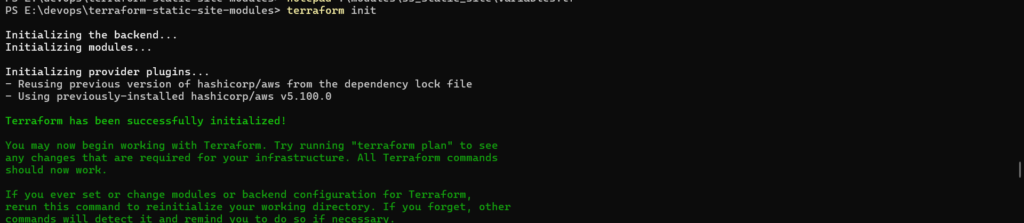
Plan the Infrastructure
terraform plan
What to Review:
- 6+ resources will be created
- S3 bucket with unique name
- CloudFront distribution (takes 10-15 minutes)
- Bucket policy for OAC access
Apply the Configuration
terraform applyType yes when prompted.
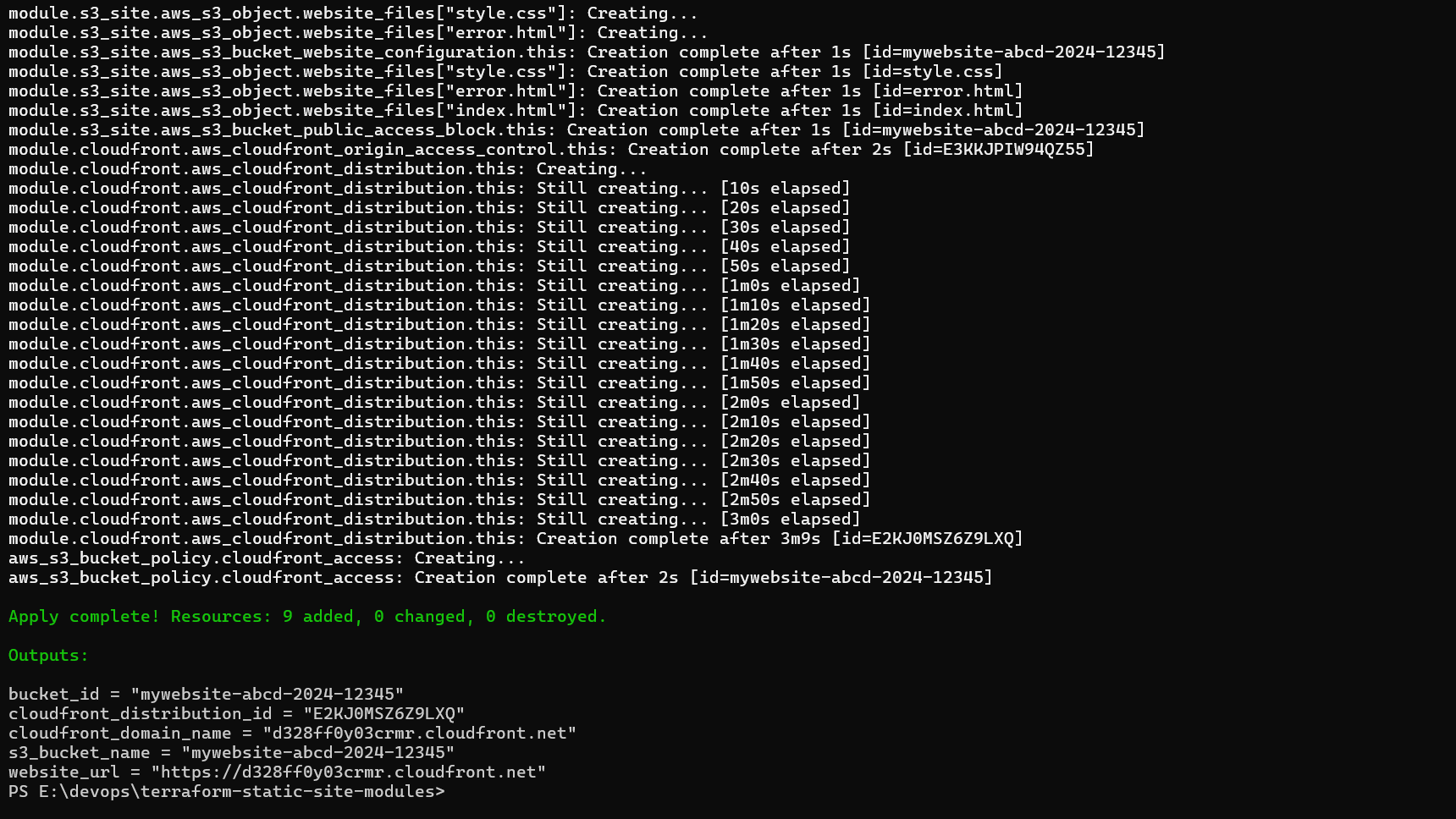
Deployment Timeline:
- S3 bucket: ~5 seconds
- File uploads: ~10 seconds
- CloudFront distribution: 10-15 minutes (this is normal!)
- Bucket policy: ~5 seconds
- Verify Outputs
Step 6: Testing
Verify in AWS Console
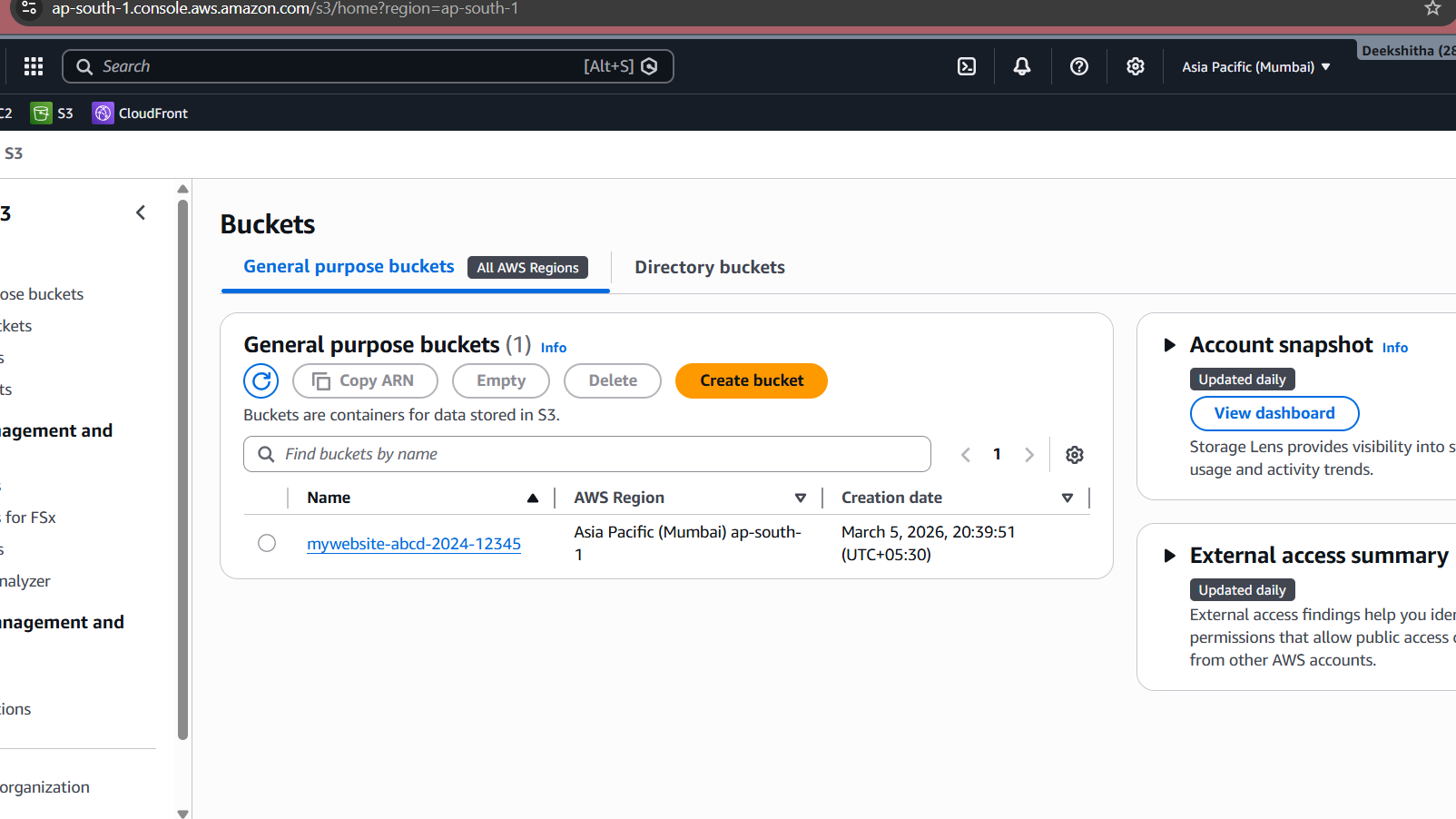
To confirm your infrastructure is properly deployed, check the AWS Console:
S3 Bucket Verification:
- Navigate to AWS Console → S3
- Search for your bucket name (e.g.,
my-unique-static-site-bucket-12345) - Click on the bucket and verify:
CloudFront Distribution Verification:
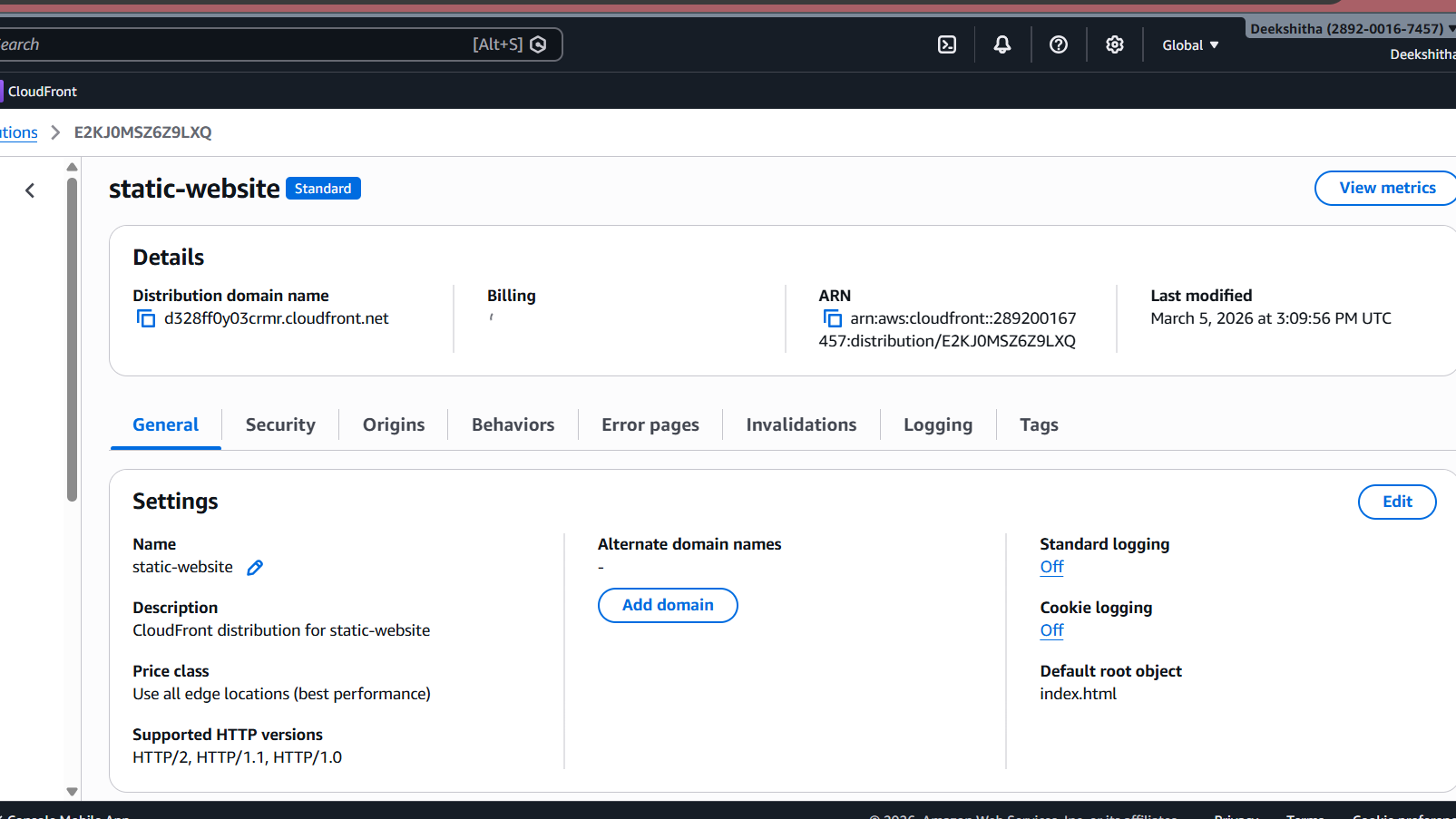
- Navigate to AWS Console → CloudFront → Distributions
- Find your distribution (Status should be “Deployed”)
- Verify the following:
- Domain name: Matches your Terraform output
- Origin: Points to your S3 bucket regional domain
- Behaviors: Default cache behavior with “Redirect HTTP to HTTPS”
- Origins → Origin access: Should show “Origin access control settings (recommended)”
Verify HTTPS
Check that HTTP redirects to HTTPS:
http://d1234567890abc.cloudfront.netShould automatically redirect to HTTPS.

Step 7 : Push to GitHub
After successful deployment and verification, I pushed the project to GitHub for version control.
A .gitignore was created to exclude Terraform state files, provider binaries, and sensitive variable files from the repository.
*/.terraform/ *.tfstate *.tfstate.backup .terraform.lock.hcl *.tfvars crash.log
Then initialized and pushed:
git init
git add .
git commit -m "initial commit: terraform static site with modules"
git remote add origin https://github.com/<username>/terraform-static-site-modules.git
git branch -M main
git push -u origin main
Repository is available at: github.com/DeekshithaRavil/terraform-static-site-modules
Conclusion
You’ve successfully built a production-ready static website infrastructure using Terraform modules that delivers exceptional performance and reliability. This architecture is highly scalable, automatically handling traffic spikes without manual intervention, ensuring your website stays responsive during peak demand. Security is paramount, with AWS best practices including Origin Access Control (OAC), HTTPS enforcement, and restricted S3 access protecting your content. The modular design makes maintenance simple—update individual components without affecting the entire infrastructure. It’s incredibly cost-effective since you only pay for what you use with no upfront costs. Performance is outstanding thanks to CloudFront’s global CDN network, caching content across edge locations worldwide for low latency and fast load times regardless of user location. This infrastructure-as-code approach provides version control, reproducibility, and the ability to deploy identical environments across development, staging, and production with a single command.
Resources
- Terraform AWS Provider Documentation
- AWS S3 Static Website Hosting
- AWS CloudFront Documentation
- Terraform Module Best Practices
